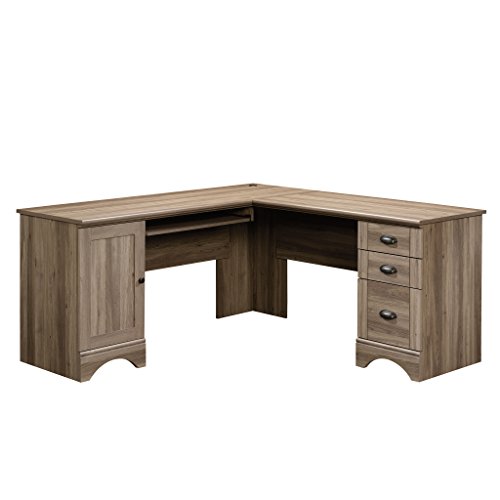
L-Shaped Desk with Keyboard Tray
Maximize your corner workspace with ergonomic comfort. Discover the best L-shaped desks featuring integrated keyboard trays for a healthier, more productive home office.
Shop Top PicksWhy Choose an L-Shaped Desk with a Keyboard Tray?
An L-shaped desk is the ultimate space-saver for corner offices, but adding a keyboard tray takes ergonomics to the next level. Whether you're a gamer, a remote worker, or a creative professional, a dedicated slide-out platform for your keyboard and mouse keeps your wrists straight, reduces shoulder strain, and frees up valuable desktop real estate. This guide covers everything you need to know—from benefits and buying criteria to the best models on the market.
If you're new to ergonomic setups, start with our desk ergonomics guide to understand posture basics. For those with limited space, explore home office desks for small spaces that also offer corner configurations.
Key Benefits of an L-Shaped Desk with Keyboard Tray
🪑 Ergonomic Comfort
Adjustable height and tilt reduce wrist strain and promote neutral arm positioning, preventing repetitive stress injuries.
📐 Space Optimization
Fits perfectly into corners, utilizing dead space while the slide-out tray keeps your main surface clear for monitors and documents.
🔄 Flexibility
Many models offer adjustable keyboard trays that can be pushed aside when not in use, giving you full tabletop access.
🧹 Clean Aesthetics
Hide cables and peripherals under the tray for a minimalist look, and pair with cable management solutions for a pristine setup.
What to Look For
Dimensions & Fit
Measure your corner space carefully. Standard L-shaped desks range from 50 to 72 inches on each wing. Ensure the keyboard tray is at least 24 inches wide to accommodate a full keyboard and mouse. For deeper workspaces, consider a 72-inch desk or 80-inch desk for added surface area.
Height Adjustability
The tray should be height-adjustable to fit your sitting or standing posture. Look for gas-spring or pneumatic mechanisms for smooth operation. Some L-shaped desks also feature electric standing desk capabilities, allowing you to switch between sitting and standing with ease.
For a budget-friendly option, a standing desk converter can transform your existing L-desk, though a dedicated tray is more stable.
Material & Build Quality
Solid wood, engineered wood, or metal frames? Each offers different durability and aesthetics. Wood desks bring warmth, while metal frames provide industrial sturdiness. Check weight capacity—the tray should support your keyboard, mouse, and occasional heavy items.
For a premium finish, explore solid wooden desks for home office that often include integrated keyboard trays.
Recommended L-Shaped Desks with Keyboard Trays
Based on expert reviews and user feedback, here are some of the best L-shaped desks with integrated keyboard trays across different budgets. Prices are estimated market averages (accurate as of 2026).
- Budget Pick: Small L-shaped desk with drawers – ~$220. Compact, includes a basic slide-out tray and side storage.
- Mid-Range: L-shaped home office desk with drawers – ~$450. Sturdy build, height-adjustable tray, and cable management grommets.
- Premium Choice: L-shaped executive desk for home office – ~$1,200. Solid wood, pneumatic keyboard tray, and locking drawers.
- Gaming Style: Gaming desk with LED lights and outlets – ~$350. Includes a wide tray, RGB lighting, and a headphone hook.
- Corner Optimized: Corner computer desk with keyboard tray – ~$280. Designed specifically for tight corners with a 180° sliding tray.
For those who prefer a DIY approach, consider buying a keyboard slide-out tray for desk separately and attaching it to your existing L-desk.
If you're working with a small area, a home office desk for small spaces with an L-shape and tray can be a lifesaver.
Ergonomic Setup Tips
Once you've chosen your desk, follow these steps to optimize your posture:
- Monitor Height: Place your monitor at eye level. Use a monitor stand or monitor arm to achieve the correct height.
- Keyboard Position: The tray should allow your elbows to rest at a 90° angle, with wrists straight. Adjust the tray tilt to negative slope for a natural hand position.
- Chair Alignment: Pair your desk with an ergonomic chair that supports lumbar curvature. Consider a high office chair for standing desk if you frequently alternate postures.
- Peripheral Placement: Keep your mouse on the same level as the keyboard. A under-desk keyboard tray can also be installed if your desk doesn't come with one.
For a complete workspace overhaul, browse our modern desk setup guide for inspiration.
Alternative Desk Styles with Trays
If an L-shape doesn't fit your space, consider these alternatives:
- Writing desks – compact, often with a single pull-out tray.
- Stand-up desks – great for health, but ensure the tray is included or add an aftermarket keyboard and mouse tray under desk.
- Gaming desks – many come with dedicated trays for peripherals.
- L-desk – generic term, but always confirm tray compatibility.
For multi-functional spaces, a loft desk bed or bunk bed with desk underneath can also include keyboard trays in their designs.
Final Thoughts
An L-shaped desk with a keyboard tray is a game-changer for anyone serious about ergonomics and productivity. It combines the spatial efficiency of a corner desk with the health benefits of a dedicated input surface. Whether you're upgrading your home office or setting up a gaming station, invest in a model that offers robust adjustability and quality materials. Use the tips above to make an informed choice, and don't forget to pair it with proper monitor placement and desk lighting for a complete workspace.
Explore our related guides on desk surfaces, power accessories, and remote work desks to further enhance your setup.