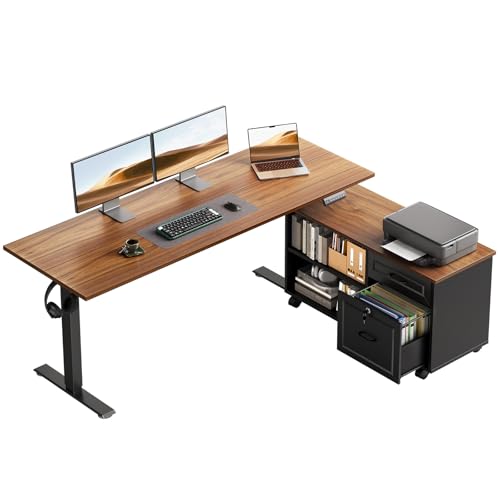
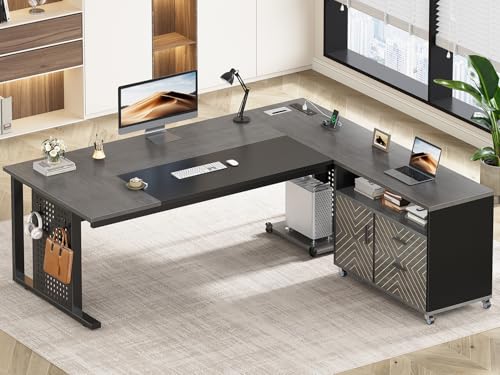
L Shaped Desk with File Drawer: The Complete Buyer's Guide
Everything you need to know about choosing an L shaped desk with integrated file storage — from drawer mechanics and build materials to ergonomic layouts and long-term durability.
START READINGWhy an L Shaped Desk with File Drawer Makes Sense
An L shaped desk with a file drawer combines two of the most practical features in home office furniture: expansive corner workspace and integrated document storage. Instead of carving out separate floor space for a freestanding filing cabinet, you get a dedicated drawer built directly into the desk's structure — usually suspended beneath one wing or housed within the return's supporting pedestal.
This configuration is particularly valuable for people who handle paper regularly: accountants, freelancers, students, small business owners, and anyone who still keeps contracts, receipts, or reference materials on hand. The file drawer keeps sensitive documents close at hand while the L shape provides room for multiple monitors, a laptop, writing space, and peripheral accessories without feeling cramped.
The integrated approach also simplifies cable management and visual clutter. With the file drawer tucked beneath the desktop, the overall footprint stays compact, and the desk reads as a single cohesive piece rather than a desk-plus-cabinet arrangement. If you are comparing broader storage formats, you may also want to explore an L shaped desk with file cabinet — which offers larger, more traditional filing capacity — or a model with two file drawers if you need to separate active and archived paperwork.
Key takeaway: An L shaped desk with file drawer is best suited for users who want corner workspace efficiency and convenient document access in a single, integrated piece of furniture — without dedicating separate floor space to a filing cabinet.
Anatomy of an L Shaped Desk with File Drawer
Before comparing models, it helps to understand the component parts that define quality and usability. An L shaped desk with file drawer is more than a flat surface with a box underneath — the way the drawer integrates with the frame has a major impact on stability, storage efficiency, and long-term satisfaction.
The Desktop Surface
The main work surface spans two wings that meet at a corner. The longer wing is typically the primary work area — where monitors, keyboard, and mouse live — while the shorter return supports secondary tasks or additional equipment. Desktop thickness varies: entry-level models often use thinner engineered panels, while mid-range and premium desks use thicker, denser cores that resist sagging over time. The corner joint should be reinforced; look for metal brackets or interlocking construction rather than simple butt joints.
The File Drawer Assembly
File drawers on L shaped desks are usually positioned beneath the return or within a supporting pedestal on one side. Key considerations include:
- Drawer slide quality: Ball-bearing slides offer smoother operation and better load tolerance than friction or roller slides. Full-extension slides let you reach the back of the drawer without straining.
- File rail system: Most file drawers accommodate letter-size hanging files; some support legal-size as well. Check whether the rails are adjustable or fixed.
- Locking mechanism: A lock adds security for sensitive documents. If this matters to you, look at an L shaped desk with locking file cabinet for added peace of mind.
- Drawer glides and stops: Quality glides prevent the drawer from slamming shut or pulling entirely free under load.
The Frame and Leg System
The frame determines how much weight the desk can handle and how stable it feels during daily use. Common configurations include:
- Steel frame with cross-bracing: The most robust option, suitable for heavy monitors and multi-monitor arms.
- Panel end supports: Cleaner-looking and often used in executive styles, but less rigid than steel.
- Pedestal-supported return: The file drawer pedestal itself supports part of the return, reducing the number of legs needed.
If you plan to place a heavy monitor arm or multiple displays, prioritise a reinforced frame. You can also review models with a built-in monitor stand if raising your screen height is a priority.
Types and Configurations
L shaped desks with file drawers come in several distinct configurations, each suited to different room layouts and workflows. Understanding these options helps you narrow your shortlist quickly.
Standard Fixed-Height Models
The most common and widely available category. These desks have a fixed working height, typically designed around seated use. They are sturdy, straightforward to assemble, and generally offer the best storage-to-footprint ratio. Within this category you'll find variations such as L shaped desks with drawers of mixed sizes, or models with a keyboard tray that frees up surface area.
Reversible Return Models
The return (the shorter wing) can be installed on either the left or right side. This flexibility is valuable if you are unsure how the desk will fit your room, or if you may rearrange furniture later. Reversible designs are common in mid-range and premium tiers. If you want even more flexibility in how the desk adapts to your space, a reversible desk with storage combines this benefit with additional compartments.
Sit-Stand and Height-Adjustable Models
Height-adjustable L shaped desks with file drawers combine the health benefits of standing with integrated storage. These models use electric or manual lift mechanisms and typically sit in the premium to professional-grade tiers due to the added engineering complexity. The file drawer must be engineered to move with the desk without compromising stability. Explore L shaped standing desks with drawers if alternating between sitting and standing is important to you, or consider a dedicated sit-stand desk with drawers for a more focused ergonomic setup.
Executive and Hutch Models
Executive-style L shaped desks pair file drawers with larger surface areas, premium materials, and often a hutch or upper storage. These are suited to home offices where visual presentation matters alongside function. Models with a hutch and file cabinet offer layered storage for documents, books, and display items.
Materials and Build Quality
The materials used in an L shaped desk with file drawer directly influence durability, appearance, and how well the desk ages. Here is how the main options compare:
| Material | Typical Tier | Best For | Key Considerations |
|---|---|---|---|
| Engineered Wood (MDF/Particle Board) | Entry-level to mid-range | Light to moderate daily use | Uniform surface, affordable within its class; edge sealing quality matters for longevity |
| Laminate over Engineered Core | Mid-range | Home offices with regular paper handling | Scratch and moisture resistant; wide range of finishes. See laminate desks for more detail |
| Solid Wood (Oak, Walnut, Maple) | Premium to luxury | Long-term investment, aesthetic focus | Repairable and ages gracefully; requires periodic care and protection from moisture |
| Steel Frame + Wood or Laminate Top | Mid-range to professional-grade | Heavy equipment, multi-monitor setups | Excellent rigidity and weight capacity; industrial aesthetic |
| Bamboo | Mid-range | Eco-conscious buyers | Harder than many woods, renewable material, consistent grain |
For the file drawer itself, look at the drawer box material. Solid wood or high-density engineered wood drawers with dovetail or reinforced joints will hold up far better under the weight of hanging files than thin stapled construction. Metal drawer sides are common in commercial-grade desks and offer excellent durability.
File Drawer Storage Capacity Explained
The storage capacity of a file drawer is not just about physical dimensions — it is about how many files you can access comfortably and how well the drawer mechanism handles the load.
Letter vs Legal Size
Most home office file drawers are designed for letter-size hanging files (approximately 8.5 × 11 inches). Legal-size capacity (8.5 × 14 inches) requires a deeper drawer and is less common on residential desks. If you regularly handle legal documents, verify this specification before committing.
Single vs Double File Drawer
A single file drawer typically holds one row of hanging files and suits light to moderate paperwork. Double file drawers — either two stacked drawers or a wider single drawer with two rows — roughly double capacity. If your workflow involves separate categories of documents (for example, client files versus internal admin), two drawers are more practical. Compare options in our guide to L shaped desks with filing drawers.
Drawer Depth and Clearance
Deeper drawers hold more files but may require more knee clearance beneath the desk. If the file drawer sits directly above your lap area, ensure the drawer depth does not restrict legroom. Full-extension slides help you reach files at the back without bending awkwardly.
Practical tip: Measure the height of your existing file folders plus the hanging rail system. Standard file drawers need roughly 10–12 inches of internal height to accommodate letter-size hanging files with tabs.
Ergonomics and Workspace Layout
An L shaped desk with file drawer offers natural zones for different tasks, but the layout only works if you position everything correctly. The goal is to keep your primary work area — monitor, keyboard, mouse — centred and free of obstruction, while using the return for secondary tasks and the file drawer for quick document access.
Monitor Placement
Place your primary monitor directly in front of your seated position, at roughly arm's length, with the top of the screen at or slightly below eye level. The corner of the L is often the best spot for a single large monitor, while dual monitors can spread along the longer wing. If you need to raise your screen, a model with a raised monitor shelf gives you storage beneath the display.
Keyboard and Mouse Zone
Your keyboard and mouse should sit at elbow height with wrists neutral. If the desktop is too high, a pull-out keyboard tray can lower your input position without affecting the main surface. For corner-focused setups, an L shaped desk with corner keyboard tray keeps your input devices centred in the angle.
File Drawer Accessibility
The file drawer should be positioned so you can open it fully without rolling your chair backward. Ideally, it sits on the side of the desk where you naturally reach — typically the return side. If you are right-handed, a drawer on the right return may feel more natural; left-handed users often prefer the opposite. Reversible-return desks let you choose.
Lighting and Cable Routing
Position the desk so that windows are to your side rather than directly behind or in front of your monitor. Use the gap behind the file drawer pedestal to route cables down and away from the work surface. Some models include built-in grommets or cable channels; if yours does not, adhesive cable clips are a simple upgrade.
How to Choose the Right Model
With the fundamentals covered, here is a practical framework for narrowing your options. Use the tier descriptors below to match models to your needs and expected usage intensity.
Step 1: Define Your Storage Needs
- Light filing (occasional documents): A single file drawer on an entry-level to mid-range desk is sufficient.
- Regular filing (daily paperwork): Look for a mid-range model with full-extension slides and a reinforced drawer box.
- Heavy filing (client files, archives): Choose a premium or professional-grade desk with double file drawers or pair the desk with a separate cabinet.
Step 2: Match the Desk to Your Room
- Measure the available corner space, including door swings and window clearances.
- Decide whether the return should be on the left or right — or choose a reversible model.
- For tight rooms, consider a compact L shaped desk with drawers for small spaces.
- If you need maximum storage in a tight footprint, review options with lots of storage that may include hutches and additional shelving.
Step 3: Assess Build Quality by Tier
| Tier | Typical Characteristics | Best For |
|---|---|---|
| Entry-level | Engineered wood panels, roller slides, basic file rail, thinner desktop | Occasional use, first home office, light filing |
| Mid-range | Thicker laminate or MDF core, ball-bearing slides, reinforced corner joint | Daily use, regular paperwork, standard monitor setups |
| Premium | Solid wood or high-grade laminate, steel frame, full-extension slides, locking option | Heavy daily use, multi-monitor, long-term investment |
| Professional-grade | Commercial construction, metal drawer sides, high weight capacity, warranty support | Small business, intensive filing, shared workspaces |
Step 4: Consider Additional Features
Depending on your workflow, additional features can make a meaningful difference:
- Cable management: Grommets, trays, or channels keep the surface clean. Browse L shaped desks with power outlets for built-in charging.
- Hutch or shelving: Useful for books, decor, and secondary storage. See L shaped desks with hutch and drawers.
- Locking drawers: Important if sensitive documents are involved. A locking drawer model adds security.
- Keyboard tray: Helps maintain ergonomic input height. Compare L shaped desks with keyboard tray and drawers.
- Matching filing cabinet: If you prefer a modular approach, a matching filing cabinet can be added alongside the desk.
Step 5: Verify Assembly and Support
Check whether the desk ships with clear instructions, labelled hardware, and a warranty. Desks in the premium and professional-grade tiers typically include more robust customer support and replacement parts availability. If assembly is a concern, look for models with pre-installed drawer slides and fewer loose components.
Setup and Maintenance Tips
Once your desk arrives, a few thoughtful steps will help you get the most from it over time.
Assembly Best Practices
- Assemble on a clean, soft surface to avoid scratching the desktop.
- Do not fully tighten all bolts until the frame is square — then tighten systematically.
- Test the file drawer operation before loading it with files; adjust the slides if the drawer binds.
- If the desk feels wobbly, check that all legs are level and the cross-bracing is secure.
Organising the File Drawer
- Use hanging file folders with clear tabs for quick identification.
- Keep the most frequently accessed files near the front.
- Avoid overloading the drawer beyond its rated capacity — this stresses the slides and drawer box.
- For archival documents, consider a separate storage solution to keep the active drawer light and functional.
Ongoing Care
- Dust the desktop regularly with a soft, slightly damp cloth.
- Use coasters and desk mats to protect the surface from heat and scratches.
- Lubricate drawer slides sparingly if they begin to squeak.
- Inspect screws and bolts every few months and re-tighten as needed.
If you are still refining your overall workspace, our guide to L shaped desks for home office covers broader layout and productivity considerations. And if storage is your top priority, the L shaped desk with storage overview compares drawer, shelf, and cabinet configurations side by side.