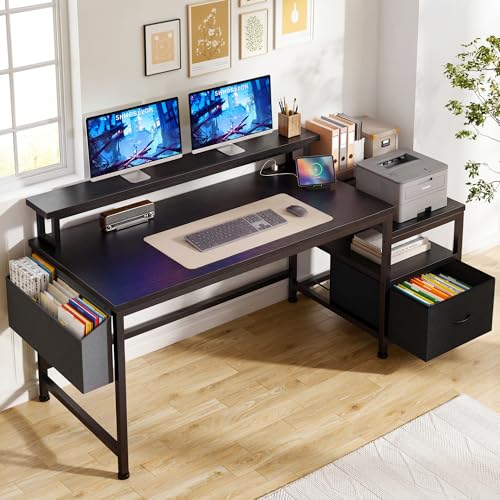
Computer Desk for 2 Monitors & Laptop
Find the perfect desk to handle your dual monitors and laptop with comfort, style, and maximum productivity. Our expert guide covers size, ergonomics, materials, and top recommendations.
Shop Top PicksWhy a dedicated desk matters: Working with two monitors and a laptop requires more surface space, better cable management, and proper ergonomic alignment. A standard desk often falls short. This guide helps you choose a desk that fits your workflow, supports your gear, and keeps you comfortable all day.
What to Look For in a Desk for 2 Monitors and Laptop
📏 Surface Size
Minimum 55" wide x 28" deep to comfortably fit two monitors (24–27") and a laptop side by side.
⬆️ Weight Capacity
Ensure the desk can hold the combined weight of monitors, laptop, and accessories. Look for 150+ lbs capacity.
🔄 Adjustable Height
A standing desk for 2 monitors lets you switch between sitting and standing, improving posture and energy.
🔌 Cable Management
Built-in trays or grommets keep wires organized and out of sight, essential for a clean multi-monitor setup.
Desk Size Guide for Multi-Monitor Setups
Choosing the right size is critical. Here’s a quick reference based on monitor configuration:
| Monitor Setup | Recommended Desk Width | Recommended Desk Depth | Notes |
|---|---|---|---|
| 2 x 24" monitors + laptop | 55" – 60" | 28" – 30" | Comfortable spacing, laptop can sit in front or to the side. |
| 2 x 27" monitors + laptop | 60" – 72" | 30" – 32" | Extra depth and width to avoid crowding. |
| 2 x 32" monitors + laptop | 72" or larger | 32" – 36" | Large format screens need spacious surfaces. |
| L-shaped setup (2 monitors + laptop) | 50" x 50" (each wing) | 28" – 30" | Great for corner offices and extra workspace. |
If you're using monitor arms, you can save desk space. For more tips, see our guide on desks with drawers and storage to keep your accessories tidy.
Ergonomics: Positioning Your Screens
Proper monitor placement prevents neck and eye strain. For a dual-monitor + laptop setup:
- Main monitor directly in front of you, top of screen at or slightly below eye level.
- Secondary monitor angled slightly toward you, placed beside the main monitor.
- Laptop can be placed on a adjustable monitor riser to bring it to eye level, or off to the side as a secondary screen.
- Keep the keyboard and mouse within easy reach, with wrists straight. Consider an under-desk keyboard tray for better ergonomics.
For a comprehensive ergonomic setup, explore our standing desk for 2 monitors and laptop guide for height adjustments and movement routines.
Desk Materials: Which One Suits You?
The material affects durability, aesthetics, and price. Here are the most common options for a dual-monitor desk:
- Solid Wood – Durable, classic look, but heavier and more expensive. Ideal for permanent setups.
- Wood Veneer / Laminate – Affordable, scratch-resistant, and available in many finishes. Great for budget-conscious buyers.
- Metal Frame – Often paired with wood or glass tops, offers stability and modern aesthetics. Check metal-framed desks for heavy loads.
- Glass – Sleek and modern, but prone to fingerprints and glare. Not recommended if you have multiple bright monitors.
For a durable yet stylish option, consider a 60" x 30" office desk with drawers that offers both surface space and storage.
Cable Management for a Clean Setup
With two monitors and a laptop, cables can quickly become a mess. Here’s how to keep it tidy:
- Use a cable tray under the desk to route power and display cables.
- Secure cables with velcro ties or cable sleeves to bundle them together.
- Consider a desk with built-in cable management grommets or channels.
- Use a USB hub to reduce the number of cables connected directly to your laptop.
For more ideas, check out our under-desk cable management guide.
Standing vs. Fixed-Height Desks
Both have their benefits. Here’s a quick comparison:
- Standing desks – Allow you to alternate between sitting and standing, reducing back pain and boosting energy. Look for adjustable standing desks with dual-motor lifts for heavy monitor loads.
- Fixed-height desks – More affordable and stable, but you must ensure the height is correct for your sitting posture. Pair with a monitor stand to adjust screen height.
If you already have a desk and want to add standing capability, a standing desk converter is a cost-effective solution.
Top Features for Your Multi-Monitor Desk
Beyond size, here are features that make a desk truly productive:
- Drawers and storage – Keep the surface clear. Check desks with file drawers for office use.
- Built-in power outlets – Charge devices without reaching under the desk. See L-shaped desks with power outlets.
- Monitor arms compatibility – Many desks support clamp-on or grommet-mounted arms. This frees up surface space.
- Wheels – If you need mobility, consider a rolling laptop desk that can be moved easily.
Who Needs a Desk for 2 Monitors and a Laptop?
This setup is ideal for:
- Software developers – Code on one screen, documentation on the second, and communication tools on the laptop.
- Financial analysts – Track data across multiple screens while keeping email and chat on the laptop.
- Content creators – Edit video on the main monitor, preview on the secondary, and manage assets on the laptop.
- Remote workers – Boost productivity by separating tasks across three screens without clutter.
If you're also considering a compact option, check our guide on computer desks that can hold 2 monitors for smaller spaces.
Final Checklist Before You Buy
- ✅ Measure your available space and monitor sizes.
- ✅ Check the desk’s weight capacity (monitors + laptop + accessories).
- ✅ Decide between standing or fixed height.
- ✅ Look for cable management features.
- ✅ Read reviews about stability and build quality.
- ✅ Consider future upgrades – a slightly larger desk offers flexibility.
For more detailed advice, see our work-from-home desk guide and adjustable height desks page.
Ready to Upgrade Your Workspace?
Browse our top-rated desks designed for dual monitors and laptops. Click below to see the latest deals and customer favorites.
Shop Recommended Desks