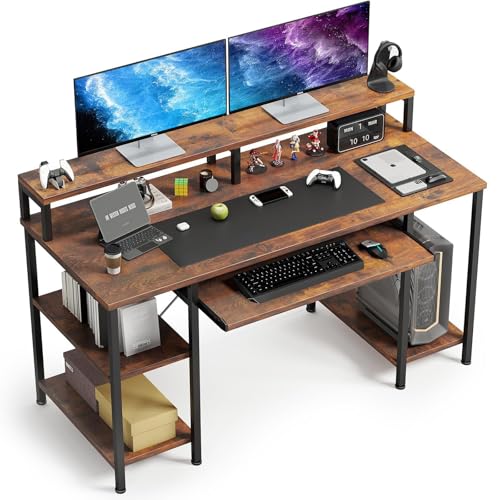
Small Office Desk with Keyboard Tray: The Complete Buyer's Guide
Discover how a compact desk with a dedicated keyboard tray can transform a tight office into an ergonomic, organized workspace. Compare designs, tray mechanisms, and storage options before you choose your next desk.
Explore Top PicksWhy a small office desk with keyboard tray deserves your attention: In a compact office, every inch matters. A keyboard tray frees up your desktop for monitors, documents, and decor while keeping your wrists in a neutral position. This guide walks you through tray types, ergonomic placement, material choices, and the trade-offs between compact and full-size designs so you can buy with confidence.
What Makes a Small Office Desk with Keyboard Tray Different?
A small office desk with a keyboard tray combines two goals: a footprint that fits tight rooms and an ergonomic layout that keeps your input devices at the right height. Unlike standard desks where the keyboard sits on the main surface, a tray-mounted design lets you lower your keyboard and mouse independently of the monitor. That separation is the key ergonomic advantage, especially when the desktop is set at standing or monitor-friendly height.
Compact desks typically range from about 36 to 48 inches wide. Within that range, the keyboard tray becomes a critical space-saver because it adds a usable input zone without expanding the desk's width. If you are also weighing storage, our guide to a small office desk with drawers explains how to combine a tray with built-in organization.
Keyboard Tray Types: Which Mechanism Suits You?
Not all trays are built the same. The mechanism affects comfort, durability, and how much legroom you keep under the desk.
Slide-Out Rail Tray
The most common design. Rails mount under the desktop and the tray glides forward and back. Simple, durable, and easy to maintain. Best for entry-level and mid-range desks.
Swivel & Articulating Tray
Adds side-to-side rotation and height adjustment. Ideal if you alternate between typing and note-taking. Typically found on mid-tier and premium models.
Fixed Under-Desk Shelf
A static shelf positioned below the main surface. Sturdy and wobble-free, but less flexible for different seating heights. Common on essential-tier desks.
Ergonomic Height-Adjustable Tray
Offers tilt and height tuning for wrist neutrality. A top-tier choice for users who spend long hours typing or who share the desk with others.
Ergonomics: Getting the Tray Height Right
The whole point of a keyboard tray is to align your elbows near a 90-degree angle while your shoulders stay relaxed. As a rule of thumb, the tray surface should sit roughly 1 to 3 inches below the main desktop. If the tray is too high, your wrists bend upward; too low, and you round your shoulders. Pair the tray with an adjustable height desk chair for home office so you can fine-tune the relationship between seat, tray, and monitor.
Monitor placement matters just as much. Keep the top of the screen near eye level and about an arm's length away. If you need to raise the display, a desk monitor stand or a computer desk with monitor shelf can help without eating into your limited surface area.
Quick Ergonomic Checklist
- Elbows at roughly 90 degrees when typing.
- Wrists neutral, not bent up or down.
- Keyboard tray centered with the monitor.
- Mouse within easy reach on the same tray or an adjacent pad.
- Feet flat on the floor or a footrest.
- Monitor top near eye level, about an arm's length away.
How to Choose the Right Size for a Compact Office
Measure your room before you shop. A small office desk with keyboard tray should leave at least 24 inches of clearance behind your chair and enough room to open drawers or slide the tray fully out. Here is a practical sizing framework:
| Desk Width | Best For | Tray Consideration |
|---|---|---|
| 36–40 inches | Single monitor, laptop, tight bedroom office | Look for a compact tray under 24 inches wide |
| 40–44 inches | Single large monitor plus accessories | Standard tray with mouse pad extension |
| 44–48 inches | Dual monitor or monitor plus printer | Full-width tray with swivel or tilt |
If your room is especially tight, a small corner computer desk or a corner computer desk with keyboard tray and storage can reclaim wasted corner space while keeping the tray ergonomics intact.
Materials and Build Quality
The desktop material affects durability, weight, and how the tray hardware mounts. Engineered wood with a laminate finish is common on entry-level and mid-range compact desks and offers good resistance to scratches. Solid wood and bamboo sit in the premium tier and provide a warmer look with repairable surfaces. Metal frames and reinforced brackets matter for tray stability, especially on slide-out designs.
When comparing tiers, keep these relative expectations in mind:
| Tier | Typical Tray Mechanism | Best For |
|---|---|---|
| Entry-level | Basic slide rail or fixed shelf | Light daily use, students, occasional typing |
| Mid-range | Smooth ball-bearing slide with mouse pad | Daily office work, mixed keyboard and mouse use |
| Premium | Articulating swivel with height and tilt tuning | Long typing sessions, shared desks, ergonomic priority |
| Professional-grade | Heavy-duty commercial hardware, reinforced brackets | Full-time remote work, multi-device setups |
Storage and Organization on a Compact Desk
A keyboard tray is only one part of an organized compact office. Consider how you will store documents, chargers, and stationery without crowding the main surface. A small desk organizer and a desk file organizer keep essentials within reach. If you need drawers, our overview of desks with storage drawers and shelves covers how to balance storage against legroom.
Cable clutter is another common pain point on compact desks. Route keyboard and mouse cables through a grommet or clip, and mount a small tray underneath to hold the power strip. Wireless peripherals reduce clutter around the sliding mechanism and make the tray easier to operate.
Small Desk vs. Standing Desk Converter
If you already own a compact desk and want to add height flexibility, a stand-up desk converter with adjustable keyboard tray can layer ergonomic adjustability onto your existing setup. For a full replacement, an adjustable height standing desk offers a more integrated solution, though compact standing models can be harder to find with a dedicated tray. Our guide to standing desks with pull-out keyboard explains the trade-offs.
Buying Checklist Before You Commit
- Measure your room and confirm clearance behind the chair.
- Check tray width against your keyboard and mouse footprint.
- Confirm weight capacity for your peripherals and typing pressure.
- Verify tray height adjustability if you share the desk or alternate seating.
- Look for cable management features such as grommets or under-desk trays.
- Review frame stability — reinforced brackets reduce wobble on slide-out trays.
- Consider future storage needs with drawers, shelves, or hutch options.
For a broader look at compact workspace planning, our small bedroom desk ideas and desk and chair for small space guides can help you fit everything together. If you prefer a wheeled setup for flexibility, compare standing desk on wheels options before deciding.
Frequently Asked Questions
What is the ideal width for a small office desk with keyboard tray?
Most compact desks with keyboard trays measure between 36 and 48 inches wide. A 40-inch model is a solid middle ground for a single monitor, a keyboard tray, and a modest amount of surface storage.
Does a keyboard tray really improve ergonomics?
Yes. A keyboard tray positions your keyboard and mouse lower than the desktop surface, which helps keep your wrists neutral and your elbows near a 90-degree angle. This is especially valuable on compact desks where the main surface sits higher.
Can a keyboard tray hold a full-size keyboard and mouse?
Many tray designs accommodate a full-size keyboard plus a mouse. Look for a tray width of at least 26 inches and a weight capacity rated for your peripherals. Some models include a dedicated mouse pad or swivel mechanism.
How do I keep cables tidy on a compact desk with a keyboard tray?
Use a cable management tray mounted under the desktop, route keyboard and mouse cables through a grommet or clip, and consider a wireless keyboard and mouse to reduce clutter around the sliding tray mechanism.
Should I choose a fixed shelf or a slide-out tray?
Choose a slide-out tray if you alternate between typing and writing or need to adjust the input height. A fixed shelf is sturdier and simpler, making it a good fit for essential-tier desks where wobble-free stability matters most.
Keep exploring: If you are building a complete compact workspace, pair your desk with an under desk chair mat for hardwood floors to protect your flooring, and review our small desk storage guide for drawer and shelf options. For corner layouts, see the small corner computer desk overview and the corner desk with monitor shelf guide.