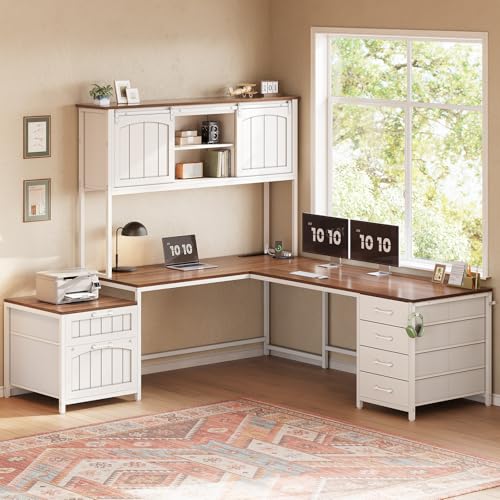
L-Shaped Desk with File Cabinet and Hutch: The Complete Workspace Guide
Everything you need to know about choosing, arranging, and getting the most from a corner desk that combines a full work surface, integrated file storage, and overhead hutch shelving.
JUMP TO BUYING GUIDEWhy this configuration works: An L-shaped desk with a file cabinet and hutch turns an awkward corner into a complete home office. You get a wide primary work surface, a secondary leg for a second monitor or paperwork, a dedicated drawer for files and supplies, and elevated shelving that keeps reference books and decor off the desktop. This guide explains who benefits most, what to check before ordering, and how to set it up for ergonomic, distraction-free work.
If you have been searching for a single desk that solves storage, surface area, and vertical organization at once, this configuration is worth serious consideration. Buyers at this research stage usually know they want a corner footprint with built-in storage, but they still need clarity on dimensions, material options, return-leg orientation, and how the hutch interacts with monitors and lighting. The sections below answer those questions in order, so you can move from research to a confident decision.
What Defines an L-Shaped Desk with File Cabinet and Hutch?
This desk type combines three components in a single corner-oriented unit:
- The L-shaped work surface: two connected legs that meet at a corner, usually with a 55 to 70 inch main span and a shorter return leg.
- The file cabinet: a built-in or freestanding pedestal with at least one letter- or legal-size file drawer, often paired with smaller utility drawers.
- The hutch: an elevated shelving unit that sits on or above the desktop, adding open cubbies, closed compartments, or a mix of both.
Together, these three elements deliver what a plain rectangular desk cannot: a natural separation between active work zones, a place to file documents immediately rather than stacking them, and vertical storage that frees up the desktop for the tasks that matter. Many buyers pair this desk with a desk monitor stand or a small desk organizer to further refine the layout.
How the L-Shape Changes Your Workflow
The corner is the natural anchor point. On most models, the main leg is where the primary monitor and keyboard live, while the return leg becomes a secondary zone for a laptop, printer, or paperwork. The file cabinet usually sits under the return leg or at the end of the main leg, so documents are accessible without leaving the chair. The hutch then holds reference materials, plants, and lighting above eye level, keeping the sightline to the monitor clean.
This zoning matters for productivity. Instead of one crowded surface, you get distinct areas for computing, reading, and storage. If your corner is tight, you can scale the concept down with a compact L-shaped desk with drawers for small spaces and still keep the same functional logic.
Who Benefits Most from This Desk Configuration?
This desk suits a specific set of users. Match yourself against the profiles below before committing:
- Remote and hybrid workers who need a dedicated, always-ready office corner at home.
- Small business owners who keep paper records and need an organized filing system within arm's reach.
- Students and researchers who juggle a laptop, textbooks, and printed notes simultaneously.
- Creative professionals who want a secondary surface for sketching, tablets, or reference materials.
- Anyone with an unused corner who wants to convert dead space into a functional workstation.
If you work primarily from a laptop and rarely handle paper, a simpler desk may be sufficient. But if your workflow involves documents, reference books, or two-monitor setups, the combination of file cabinet and hutch earns its footprint.
Storage Breakdown: File Cabinet and Hutch Explained
The File Cabinet Component
File storage is the practical backbone of this desk. Most models offer one of three configurations:
- Built-in pedestal: the cabinet is fixed under the desktop, often with a file drawer plus two utility drawers.
- Mobile pedestal: a rolling cabinet that tucks under the desk but can move to another room when needed.
- Open file cubby: a simpler shelf-style slot for hanging folders, common on entry-level models.
Before ordering, confirm the drawer accommodates the folder size you use. Letter-size drawers are the most common; legal-size drawers are deeper and often reserved for mid-range and premium models. A locking drawer is a worthwhile feature if your desk sits in a shared or semi-public space. You can extend the storage concept with a desk file organizer for active documents that need to stay on the desktop.
The Hutch Component
The hutch is what separates this desk from a standard corner model. Common layouts include:
- Open cubby hutch: two to four open shelves, ideal for books, binders, and decor.
- Mixed hutch: open shelves plus one or two closed cabinet doors for hiding clutter.
- Full hutch: a taller unit with multiple shelves, sometimes including a corkboard or lighting strip.
Hutch height matters more than most buyers expect. Measure the clearance between the desktop and the bottom shelf to ensure your monitor fits. A typical hutch leaves 18 to 24 inches of vertical space, which suits most 24- to 27-inch monitors on a stand. If you use a taller display or a monitor arm, check the clearance or choose a hutch with an open center section. Pairing the hutch with a small monitor shelf can improve sightlines on shorter units.
If you need more shelving than a standard hutch offers, compare this setup with an L-shaped desk with hutch and bookcase, which adds a taller vertical storage column.
Dimensions and Footprint: What to Measure Before You Buy
Corner desks live or die by measurements. Use this checklist before ordering:
- Measure both wall lengths of your corner
- Confirm the main leg span (typically 55–70 in)
- Confirm the return leg span (typically 40–55 in)
- Check desktop depth (20–24 in per side)
- Measure hutch height and shelf clearance
- Verify file drawer size (letter vs. legal)
- Check knee space under the main leg
- Confirm the return-leg orientation (left or right)
Return-leg orientation is the most common ordering mistake. A desk with a left-facing return will not fit a right-corner nook, and vice versa. Measure your corner, sketch the footprint on paper, and confirm the orientation in the product listing. If you need a reversible configuration, look for a model explicitly labeled as reversible, such as an L-shaped desk with reversible desk design.
Also account for door swings, closet clearance, and chair pull-out space. A corner desk needs roughly 36 inches of clear floor behind the chair for comfortable movement.
Materials and Build Quality: Reading the Specs Like a Pro
Desk construction falls into a few recognizable tiers. Understanding them helps you compare models on substance rather than marketing language.
| Tier | Typical Construction | Best For | Durability Notes |
|---|---|---|---|
| Entry-Level | Particle board with laminate finish, light steel frame | Light daily use, students, occasional home office | Adequate for laptops and paperwork; avoid heavy monitors on thin tops |
| Mid-Range | MDF or engineered wood with veneer, reinforced steel legs | Daily remote work, dual-monitor setups | Balanced tier; solid build with better scratch resistance |
| Premium | Solid wood top or high-grade engineered core, heavy-duty frame | Full-time professionals, paper-heavy workflows | Long-term investment; resists warping and surface wear |
| Top-Tier | Hardwood, commercial-grade steel, precision hardware | Executive offices, shared workspaces | Commercial-grade durability; supports heavy equipment |
A few spec details separate a well-built desk from a compromised one. Look for a desktop thickness of at least 1 inch on engineered wood models, steel legs with a gauge rating rather than a vague "heavy-duty" claim, and metal drawer glides rather than plastic. If the hutch attaches to the desktop, check whether the mounting hardware is metal and whether the hutch has a back panel for rigidity.
For buyers who prefer natural surfaces, a wood desktop paired with a separate frame is a flexible alternative. If you want the same storage concept with a different material palette, browse the broader range of L-shaped desks with hutch and shelves.
Ergonomic Setup: Making the Corner Work for Your Body
A corner desk can be highly ergonomic, but only if you position the components deliberately. Follow this sequence:
- Set the primary monitor first. Place it at the corner or along the main leg, at arm's length, with the top of the screen at or slightly below eye level.
- Position the keyboard and mouse so your elbows rest at roughly 90 degrees and your wrists stay neutral. A keyboard tray helps if the desktop is tall.
- Place the file cabinet so it does not block knee space. A mobile pedestal is easiest to reposition.
- Use the return leg for a secondary monitor, laptop, or paperwork, angled slightly inward for easy reach.
- Add lighting that does not glare on the screen. A hutch-mounted light bar or a desk lamp with a diffuser works well.
If you plan to alternate between sitting and standing, consider a height-adjustable model. An L-shaped desk that raises and lowers preserves the corner layout while adding movement throughout the day. Pair it with an adjustable height desk chair for standing desks to keep posture consistent in both modes.
Chair clearance is another factor. Confirm the distance between the file cabinet and the main leg supports your chair's base. If space is tight, a comfortable desk chair for small spaces can make the difference.
Organization Strategy: Getting the Most from Every Zone
Storage only helps if it is used deliberately. A simple zone plan keeps the desk functional:
- Corner zone: primary monitor, keyboard, mouse, and the items you touch every hour.
- Main leg (outer end): phone, charging station, and a small tray for keys and wallet.
- Return leg: laptop, printer, or paperwork tray; keep it clear enough to write on.
- File cabinet: active project folders in the top drawer, archived documents below, supplies in the utility drawer.
- Hutch: reference books and binders on the lower shelf, decor and plants on the top shelf, and closed compartments for clutter.
Cable management is the final step. Route power and monitor cables along the back edge, use adhesive clips or a tray under the desktop, and keep the hutch shelves free of trailing wires. A small desk storage solution for pens and small tools prevents surface clutter from creeping back.
If the hutch includes a corkboard or pegboard panel, use it for a weekly priority list and reference cards rather than decorative clutter. The goal is a desk that stays organized without daily effort.
How It Compares to Related Desk Configurations
Buyers often weigh this desk against nearby alternatives. Here is a straightforward comparison:
| Configuration | Strength | Trade-Off | Best For |
|---|---|---|---|
| L-shaped with file cabinet and hutch | Maximum storage plus wide surface | Larger corner footprint | Paper-heavy home offices |
| L-shaped desk with file drawers | Focused document storage | Less vertical shelving | Minimalist setups with active files |
| L-shaped desk with hutch and keyboard tray | Better wrist posture plus shelving | Fewer file drawers | Typists and writers |
| L-shaped computer desk with file cabinet | Simple, computer-focused layout | Limited vertical storage | Dual-monitor users without paper files |
| L-shaped computer desk with hutch and drawers | Balanced drawer and shelf storage | Hutch may limit monitor height | General home office use |
If your priority is raw storage volume, the hutch-and-file-cabinet configuration wins. If you want maximum flexibility for monitor placement, a hutch-free model with a monitor stand may suit you better. For very tight rooms, a 48-inch L-shaped desk with drawers keeps the corner concept in a smaller footprint.
Buying Checklist: Ten Questions to Answer Before You Order
Use this list as a final filter. If you can answer all ten, you are ready to choose a model.
- Does the return leg fit my corner's orientation?
- Is the main leg long enough for my monitor and keyboard?
- Does the file drawer accept the folder size I use?
- Is the hutch clearance tall enough for my monitor?
- Is the desktop thick enough for my equipment?
- Are the drawer glides metal rather than plastic?
- Does the frame have a gauge rating or load capacity listed?
- Is the hutch removable if I want an open surface later?
- Does the desk ship with cable management or grommets?
- Is assembly manageable for one person?
Two additional considerations deserve attention. First, assembly time: hutch-mounted models take longer to build, so plan for two to three hours on a weekend. Second, future flexibility: a removable hutch and a mobile file pedestal give you the option to reconfigure the desk later without replacing it.
If you share the workspace or need to connect multiple devices, look for models with built-in outlets, such as an L-shaped desk with built-in outlets, or add a monitor stand with USB pass-through for charging.
Ready to Compare Models?
Browse curated options that match the configuration described in this guide, then use the checklist above to filter by dimensions, storage, and build quality.
VIEW RECOMMENDED OPTIONSFrequently Asked Questions
What are the benefits of an L-shaped desk with a file cabinet and hutch?
This configuration combines a spacious corner work surface, integrated document storage, and elevated shelving in one footprint. It improves organization, keeps reference materials within reach, and supports a more efficient workflow for home office users who handle paper and reference books alongside a computer.
How much floor space does it require?
Most models occupy a corner footprint of roughly 55 to 70 inches on each leg, with a depth of 20 to 24 inches per side. Always measure your room and confirm the return leg length before ordering, especially in small home offices.
Is an L-shaped desk with a file cabinet ergonomic?
Yes, when configured correctly. Position the primary monitor at the corner or along the main leg, keep the keyboard at elbow height, and place the file cabinet so it does not block knee space. Pair it with an ergonomic chair and a monitor arm for best results.
What materials are best?
Engineered wood with laminate or veneer finishes offers a balanced tier of durability and visual appeal. Solid hardwood tops and high-grade steel frames sit in the premium and top-tier range. Bamboo and MDF with reinforced bracing are strong choices for everyday home office use.
Can the hutch be removed?
On many models, yes. A removable hutch gives you the option to convert the desk into an open-surface corner desk later. Check the product listing for whether the hutch is bolted or freestanding, and whether removing it leaves visible mounting holes.
How does this desk compare to a straight desk with a separate filing cabinet?
The L-shape provides a natural two-zone layout and uses corner space that a straight desk leaves empty. A straight desk with a separate cabinet is easier to move and reconfigure, but it typically offers less total surface area in the same room footprint.
Final Thoughts
An L-shaped desk with a file cabinet and hutch is a practical answer to a common home office problem: too much equipment and paperwork competing for too little surface. The corner layout creates natural work zones, the file cabinet keeps documents organized without leaving the chair, and the hutch moves reference materials off the desktop. Measure carefully, confirm the return-leg orientation, and match the construction tier to your daily workload. With those three steps done, this desk configuration becomes a long-term workspace foundation rather than a temporary fix.