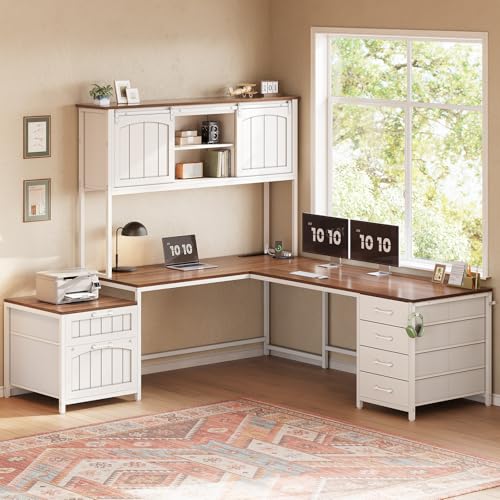
L Shaped Desk with Hutch and Keyboard Tray: The Complete Workspace Guide
An L shaped desk with a hutch and keyboard tray combines expansive corner surface area with vertical storage and ergonomic typing comfort. This guide explains how to choose, arrange, and maintain this popular home office configuration so you can build a workspace that supports productivity and long-term comfort.
Explore Recommended ModelsWhy this configuration works: The L shape wraps around the corner of a room, giving you a dedicated area for a computer and a separate zone for paperwork or creative work. The hutch adds shelves for books, decor, and office supplies without consuming desktop depth. A keyboard tray keeps your arms at a neutral angle and frees the main surface for monitors, documents, and task lighting.
Key Benefits of an L Shaped Desk with Hutch and Keyboard Tray
This desk style is popular in home offices because it solves several workspace problems at once. The L shaped footprint turns an unused corner into a productive zone, while the hutch and keyboard tray add function without adding clutter.
- Corner efficiency: The two-span layout provides more usable surface than a straight desk of similar footprint. You can dedicate one wing to a monitor and the other to writing, drawing, or a second screen.
- Vertical storage: A hutch keeps reference books, binders, plants, and small accessories off the main surface, which helps preserve clear space for daily tasks.
- Ergonomic typing: A keyboard tray places the keyboard and mouse at a lower, adjustable height so your shoulders relax and your wrists stay neutral. This is especially helpful when the desk surface is used for monitor viewing at eye level.
- Multitasking friendly: The two wings support dual monitor setups, a laptop plus external display, or a computer station alongside a dedicated paperwork area.
- Space definition: In open-plan or studio apartments, an L shaped desk visually anchors a work zone without the need for walls or room dividers.
If you need extra drawer space alongside the hutch, consider models like the L shaped desk with hutch and storage or the L shaped desk with hutch and shelves for more open display options.
Sizing and Room Planning
Before choosing a model, measure your room and map out the corner where the desk will sit. The main span and return span should leave enough clearance for the chair to rotate freely and for drawers or doors to open without obstruction.
- Main span: Common home office sizes range from around 48 inches to 60 inches. A larger span supports dual monitors and a document area.
- Return span: The shorter wing should be deep enough for a keyboard tray and a secondary task zone. Check that the tray extends without hitting the hutch side panel.
- Hutch height: The hutch should not block your view of the monitor or push the monitor too close to your eyes. Measure from the desktop to the bottom of the hutch shelves and confirm your monitor fits below or beside it.
- Chair clearance: Allow at least 30 inches of knee space under the main work surface and verify that the keyboard tray does not reduce legroom.
- Room traffic: In small rooms, a compact L shaped desk such as the L shaped desk for small office space keeps the corner efficient without dominating the room.
For rooms where storage is a priority, the L shaped desk with drawers for small space combines compact dimensions with built-in organization.
Ergonomics and Keyboard Tray Positioning
An L shaped desk with a hutch and keyboard tray is only as good as its ergonomic setup. The goal is to keep your monitor at eye level, your keyboard at elbow height, and your wrists straight while typing.
- Keyboard tray height: Adjust the tray so your upper arms hang relaxed and your forearms are roughly parallel to the floor. Your wrists should not bend upward or downward while typing.
- Monitor distance: Place the monitor about an arm’s length away, with the top of the screen near or slightly below eye level. The hutch should not force the monitor too close.
- Mouse placement: Choose a tray wide enough for both keyboard and mouse, or use a tray with a separate mouse platform to avoid reaching.
- Chair fit: Pair the desk with an ergonomic chair that supports the lower back. The ergonomic desk chair guide explains seat depth and lumbar support in more detail.
- Foot support: If the keyboard tray lowers your working height, use a footrest or adjust your chair so your feet stay flat on the floor.
For sit-stand flexibility, consider pairing your setup with an adjustable height standing desk or a standing desk converter with dual monitor mount to alternate between sitting and standing.
Hutch Storage and Organization
The hutch is what makes this desk configuration stand out for organization. Use the shelves intentionally so the desk stays clear and the hutch does not become a clutter trap.
- Reference zone: Keep frequently used books, manuals, and binders on the lowest hutch shelf within easy reach.
- Display zone: Use the upper shelves for plants, framed photos, or decorative items that make the workspace feel personal.
- Supply zone: Group pens, sticky notes, and small tools in a small desk organizer or desk file organizer to keep the shelves tidy.
- Device zone: Place speakers or a small charging station on the hutch, but leave ventilation space around electronics.
- Weight limits: Check the hutch’s weight capacity and avoid overloading upper shelves with heavy reference books.
If you prefer a more open look, the L shaped desk with hutch and bookcase adds taller shelving for a library-style office.
Materials and Construction Tiers
L shaped desks with hutches and keyboard trays are available across several construction tiers. The right choice depends on how much use the desk will see and the style you want for your office.
| Tier | Typical Materials | Best For |
|---|---|---|
| Entry-level | Engineered wood with laminate finish, light metal frame | Students, light home office use, first workspace |
| Mid-range | Reinforced engineered wood, veneer surfaces, sturdier steel frame | Daily home office work, dual monitor setups |
| Premium | Solid wood or bamboo top, high-grade steel frame, quality hardware | Professional home offices, long-term use |
| Luxury / commercial-grade | Hardwood, custom joinery, heavy-duty frame, premium finish | Executive offices, design-focused workspaces |
Solid wood and bamboo surfaces can be maintained with appropriate care. For guidance, see the wood desktops overview. If you want a cohesive look, explore desk color scheme ideas before committing to a finish.
Cable Management and Power
A hutch and keyboard tray create more surfaces and more devices, so cable management deserves attention from the start. Plan routing before you assemble the desk.
- Under-desk trays: Mount cable trays beneath the main span to hold power strips and adapters out of view.
- Grommets and raceways: Route monitor and keyboard cables through desk grommets or along the frame with adhesive raceways.
- Keyboard tray cables: Leave slack for the tray to slide in and out without pulling or straining the cable.
- Hutch devices: Keep chargers and hubs on the hutch only if ventilation is adequate, and use short cables to reduce tangling.
- Power access: Models with built-in outlets, such as the L shaped desk with built-in outlets, simplify device charging.
For a cleaner look, the L shaped computer desk with cable management includes routing features designed for multi-device setups.
Step-by-Step Setup and Placement
Follow a logical sequence when assembling and placing your L shaped desk with hutch and keyboard tray to avoid rework and to confirm ergonomics before daily use.
- Step 1 — Clear the corner: Remove existing furniture and confirm floor level. Use a mat or floor protectors if needed, such as an under desk chair mat for hardwood floors.
- Step 2 — Assemble the frame: Follow the manufacturer’s instructions and keep hardware organized. For larger desks, two people make the process safer.
- Step 3 — Attach the keyboard tray: Confirm the tray slides fully and does not contact the hutch or drawers. Adjust height before loading the desk.
- Step 4 — Mount the hutch: Secure the hutch according to the instructions and check stability. Distribute weight evenly across shelves.
- Step 5 — Position the monitor: Set the monitor at eye level and at a comfortable distance. If you need a riser, the desk monitor stand guide can help.
- Step 6 — Route cables: Connect devices, route cables through trays and raceways, and test the keyboard tray movement.
- Step 7 — Organize: Add organizers, lighting, and decor. Keep the main work surface clear for daily tasks.
If your room is tight, review small bedroom desk ideas for layout inspiration before final placement.
Configuration Comparison
Different L shaped desk configurations suit different priorities. Use this comparison to match the desk to your workflow.
| Configuration | Best For | Key Consideration |
|---|---|---|
| Hutch + keyboard tray | Ergonomic typing with vertical storage | Confirm tray clearance below the hutch |
| Hutch + file cabinet | Document-heavy work and filing | Check cabinet door swing and knee space |
| Hutch + bookcase | Library-style office and reference materials | Verify total height fits the room |
| Drawers + keyboard tray | Compact storage with ergonomic typing | Balance drawer depth with legroom |
| Corner keyboard tray | Centered typing position in the corner | Check tray pivot range and cable slack |
For multi-purpose rooms, the L shaped desk with reversible desk allows the return to be mounted on either side, which helps adapt to different room layouts.
Frequently Asked Questions
What are the benefits of an L shaped desk with a hutch and keyboard tray?
An L shaped desk with a hutch and keyboard tray maximizes corner workspace, provides vertical storage, and promotes ergonomic typing posture by keeping the keyboard at the right height. It suits multitasking, dual-monitor setups, and small home offices.
How do I choose the right size for an L shaped desk with hutch?
Measure your room and account for chair clearance, hutch height, and monitor sightlines. A 48-inch to 60-inch main span is common for home offices, while larger L shaped configurations suit dedicated workspaces. Always check that the keyboard tray does not collide with the hutch.
Can a keyboard tray be added to an existing L shaped desk with a hutch?
Yes, many under-desk keyboard trays are retrofittable if the desk has enough clearance and a solid mounting surface. Check tray width, weight capacity, and that the tray slides freely without hitting hutch supports or drawers.
What materials work best for an L shaped desk with hutch and keyboard tray?
Engineered wood with laminate or veneer offers durability and consistent finishes, while solid wood and bamboo provide premium aesthetics. Metal frames add stability for larger L shaped desks. Choose moisture-resistant finishes for long-term use.
How do I organize cables on an L shaped desk with a hutch?
Use cable trays, raceways, and sleeves to route wires along the desk frame. Mount power strips under the desktop and keep hutch shelves for devices that need ventilation. Label cables for easier maintenance.
Final tip: Before you commit to a model, confirm the keyboard tray height range, the hutch shelf clearance, and the desk’s weight capacity. These three details determine whether the desk will feel comfortable for long work sessions and whether your monitor and storage items will fit safely.