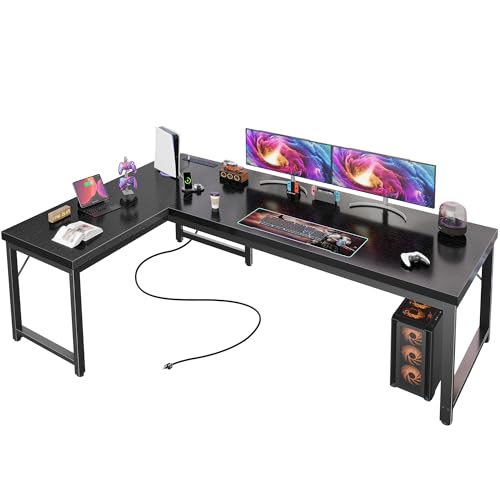
L-Shaped Desk with Reversible Desk: The Ultimate Workspace Flexibility Guide
Maximize your home office with a desk that adapts to your room, not the other way around. Learn how a reversible L-shaped desk delivers corner efficiency, generous work surface, and left-or-right configuration freedom.
Explore the Buying GuideWhy a reversible L-shaped desk matters: Most home offices are not perfectly symmetrical. Windows, doors, radiators, and wall outlets dictate where a desk can go. A reversible L-shaped desk lets you flip the return section to the left or right during assembly, so you can claim the best corner of your room without compromising on work surface, storage, or cable routing. This guide explains exactly how to choose, place, and use one.
What Is an L-Shaped Desk with a Reversible Desk?
An L-shaped desk with a reversible desk is a two-part workstation: a main rectangular desk and a secondary return section that forms the "L". The word reversible means the return can be attached to either the left or right side of the main desk during assembly. This single design feature gives you:
- Room-layout freedom — place the long edge against whichever wall fits best.
- Handedness comfort — left-handed users can route the return to the left for natural reach.
- Window and light optimization — keep the return on the shaded side to reduce monitor glare.
- Cable management flexibility — route power and data toward the nearest outlet.
A reversible L-shaped desk is especially valuable in apartments, bedrooms, and shared home offices where the desk footprint must cooperate with doors, closets, and traffic lanes. For a broader look at L-shaped configurations, see our guides on the L-shaped desk with drawers and file cabinet and the L-shaped desk with hutch and shelves.
Key Buying Factors for a Reversible L-Shaped Desk
Before you commit, evaluate these dimensions and features. They determine whether the desk will feel spacious or cramped once installed.
1. Desk Dimensions and Work Surface
A typical L-shaped desk offers between 55 and 78 inches on the main span, with the return adding 30 to 47 inches of depth. For dual-monitor workflows, aim for at least 60 inches of main span. If you need storage, compare models with built-in drawers for small spaces. For a compact option, the 48-inch L-shaped desk with drawers is a proven footprint for tight rooms.
2. Reversibility Mechanism
Most reversible desks use pre-drilled symmetric holes on both sides of the main desk. Check that the manufacturer provides clear left/right assembly instructions. High-end tier models may include tool-free cam locks, while entry-level tiers often rely on Allen-key bolts. If you plan to reconfigure later, prioritize models with reinforced steel brackets at the joint — this is where stand-up desk frame quality becomes relevant if you ever upgrade to a sit-stand base.
3. Materials and Surface Durability
Reversible L-shaped desks are commonly built from engineered wood, laminate, or wood desktops. Laminate is the most common in the mid-range tier because it resists scratches and spills. Premium and luxury tiers often use solid wood or heavy-duty steel frames. If you care about surface feel, compare our guide to desk mats to protect the finish.
4. Storage and Cable Management
The return section is prime real estate for drawers, file cabinets, or open shelving. Models with built-in cable management keep power strips and monitor cables off the floor. If you need integrated power, look for the L-shaped desk with built-in outlets.
5. Ergonomics and Height
Standard desk height is 28 to 30 inches, but your ideal height depends on your seated elbow height. Use our office desk height calculator to verify before buying. Pair the desk with an adjustable-height desk chair for home office use so you can fine-tune posture. If you want the option to stand, consider the L-shaped desk that raises and lowers.
Reversible L-Shaped Desk Tiers Compared
The table below compares reversible L-shaped desk categories by build quality, features, and best use case. Descriptors are tier-based and relative, not absolute.
| Tier | Best For | Typical Build | Reversibility Features |
|---|---|---|---|
| Entry-Level | Students, first home office, light daily use | Laminate over particle board, basic steel legs | Symmetric pre-drilled holes, Allen-key assembly |
| Mid-Range | Full-time remote workers, dual-monitor setups | Reinforced engineered wood, powder-coated steel frame | Tool-free cam locks, reinforced corner brackets |
| Premium | Creative professionals, multi-device workflows | Solid wood top or heavy-duty steel, cable trays included | Modular return, integrated grommets, leveling feet |
| Luxury | Executive home offices, long-term investment | Hardwood or commercial-grade steel, premium finish | Fully modular, reversible return, hidden cable spine |
Mid-range models usually offer the smoothest reversibility experience because the joints and hardware are engineered for repeated assembly. Entry-level tiers are perfectly usable but may require more careful alignment during the first build.
Placement Strategy: How to Choose Left vs. Right
The reversible feature is only useful if you plan the orientation. Use this decision framework:
- Map the room: Sketch doors, windows, radiators, and outlets. Mark your chair position and monitor sightline.
- Follow the light: Keep monitors perpendicular to windows. If the window is on the left, put the return on the right to avoid backlighting.
- Respect handedness: Right-handed users often prefer the return on the left so the dominant arm has open space. Left-handed users mirror this.
- Plan cable routes: Route the return toward the nearest outlet and pair with a desk file organizer for documents.
- Test traffic lanes: Ensure the L does not block closet doors, drawers, or chair movement.
Setup Recommendations for Your Reversible Desk
Once the desk is in place, optimize the surface for productivity and comfort:
- Monitor placement: Keep the main monitor at eye level on the return side; use a desk monitor stand or small monitor shelf to raise it.
- Storage: Use the return for a small desk storage solution or a desk file organizer.
- Cable control: A cable-managed L-shaped desk setup keeps the return clean and safe.
- Comfort: Pair with an adjustable-height desk chair for standing desk use if you ever add a converter.
- Gaming and work: The L-shaped desk for gaming and work layout benefits from a reversible return that keeps the console and monitor cables separated.
Common Mistakes to Avoid
- Ignoring outlet placement: Reversing the return after assembly is possible but tedious. Decide before you build.
- Underestimating depth: A shallow return (under 19 inches) cannot hold a keyboard and monitor comfortably.
- Skipping the leveling feet: Uneven floors cause wobble. Premium tiers include leveling feet for a reason.
- Overloading the return: Check the weight rating. Entry-level returns often support lighter loads than the main desk.
- Forgetting chair clearance: Allow at least 24 inches of knee space and chair roll room.
Related Desk Guides
Explore Related L-Shaped and Workspace Guides
- L-Shaped Desk with Drawers and Keyboard Tray
- L-Shaped Desk with Corner Keyboard Tray
- L-Shaped Desk with Hutch and Storage
- L-Shaped Desk with Hutch and Bookcase
- L-Shaped Computer Desk with Drawers and Shelves
- L-Shaped Computer Desk for Small Spaces
- L-Shaped Desk for Home Office with Drawers
- L-Shaped Desk for Small Office Space
- L-Shaped Desk with File Drawers
- L-Shaped Computer Desk with Power Outlet
Frequently Asked Questions
What does a reversible L-shaped desk mean?
A reversible L-shaped desk allows you to assemble the return section on either the left or right side during setup. This flexibility lets you match the desk to your room layout, dominant hand, and workflow preferences without buying a different model.
Is an L-shaped desk with a reversible desk good for small spaces?
Yes. The reversible design lets you place the longer section against the wall that best fits your room. Corner placement maximizes floor space while providing a generous work surface and storage. Pair it with a small home office L-shaped desk layout for the best fit.
How do I choose the right orientation for my reversible desk?
Consider natural light direction, window placement, door swing, dominant hand, monitor placement, and cable routing. Test both orientations mentally or with cardboard templates before final assembly. If you need more storage, a drawer-equipped model may suit you better.
Can I change the orientation after assembly?
Usually yes, but it requires disassembly of the return joint. Mid-range and premium tiers with tool-free cam locks make this easier. Entry-level tiers may require a second person and additional time. Plan the orientation before your first build to avoid unnecessary work.
What is the best material for a reversible L-shaped desk?
Laminate over engineered wood is the most durable in the mid-range tier for daily use. Solid wood and heavy-duty steel dominate the premium and luxury tiers. For surface protection and aesthetics, consider a desk mat.
Final Buying Checklist
- Confirm the return can attach to both left and right sides.
- Measure your room and verify the main span plus return depth.
- Check weight rating for the main desk and the return separately.
- Verify cable management routing toward your nearest outlet.
- Confirm chair clearance and knee space of at least 24 inches.
- Plan monitor placement using a desk monitor stand or small monitor shelf.
- Pair with an adjustable-height desk chair for posture support.
- Choose a tier that matches your daily usage: entry-level for light use, mid-range for full-time, premium or luxury for professional workflows.