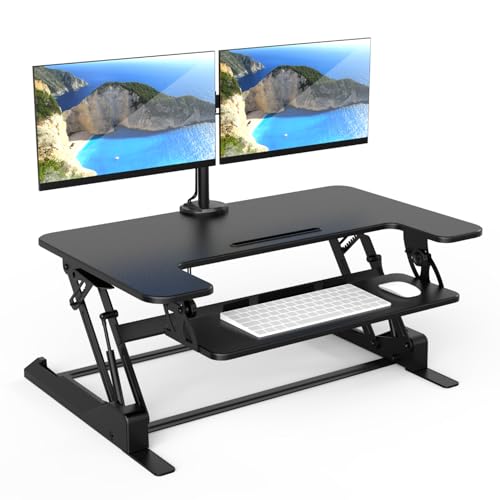
Standing Desk Converter for Two Monitors: The Complete Guide to a Healthier Dual-Screen Workspace
If you work with two monitors, a standard riser will not cut it. This guide explains exactly how to choose a standing desk converter for two monitors, what to measure before you buy, how to set it up ergonomically, and which features actually matter for daily sit-stand switching.
Explore Recommended ConvertersWhy a Standing Desk Converter for Two Monitors Is Different
A standing desk converter for two monitors is not simply a wider version of a laptop riser. When two screens sit side by side, the load distribution changes, the center of gravity shifts, and the platform must remain rigid as you raise and lower it several times a day. A converter that feels perfectly stable with one monitor can wobble noticeably once a second screen is added.
The dual-screen workflow also changes your ergonomic priorities. With two monitors, your neck rotates between screens, so the platform height must keep both screens at or slightly below eye level. The surface must be wide enough that the monitors do not crowd the keyboard, and the depth must leave room for a keyboard tray or a comfortable typing position. That is why a dedicated converter built for two monitors is a better starting point than a generic single-screen unit.
If you are still deciding between a converter and a full standing desk, the comparison between a standing desk converter and a complete sit-stand frame is worth reviewing. Converters sit on top of your existing desk, require no assembly of a new frame, and can be moved between rooms. For renters, shared offices, or anyone who does not want to replace a favorite desk, that flexibility is a major advantage.
Quick rule of thumb: a dual-monitor converter should offer a top surface of at least 36 inches wide and 22 to 24 inches deep, with a rated weight capacity that comfortably exceeds the combined weight of both monitors plus the keyboard and mouse.
Key Specs to Compare Before Buying
Most buying mistakes happen before the purchase, when shoppers compare converters by appearance rather than by specification. The table below summarizes the specifications that matter most for a two-monitor setup, along with what to look for in each tier.
| Specification | What It Affects | What to Look For |
|---|---|---|
| Top surface width and depth | Whether two monitors fit side by side with room for the keyboard | 36 inches wide minimum; 40 inches or more for 27-inch and larger screens |
| Weight capacity | Stability, lift smoothness, and long-term durability | Headroom above your combined monitor and accessory weight |
| Height adjustment range | Whether the platform reaches standing eye level | Enough lift for your standing elbow height plus monitor height |
| Lift mechanism | Effort, speed, and smoothness of switching | Gas spring for quick single-hand lifts; electric for heavier dual loads |
| Keyboard tray | Typing posture and wrist comfort | Separate, height-adjustable tray with room for mouse movement |
| Base footprint | Whether it sits safely on your current desk | Base fully supported by the desktop with no overhang |
Surface Width and Depth
Two 24-inch monitors side by side need roughly 42 to 46 inches of horizontal space once bezels and stands are counted. Two 27-inch monitors need more, and if either screen is mounted on a separate arm, the base footprint changes again. Measure the actual width of your monitors including their stands, then add at least four inches of clearance on each side. Depth matters just as much: a platform that is only 20 inches deep forces the keyboard forward and pushes the screens too close to your eyes.
Weight Capacity and Lift Mechanism
Dual monitors are heavier than most shoppers expect, especially when combined with a monitor arm, a webcam, and a desk lamp. Compare the rated capacity to the real total load, and prefer a converter that is rated well above your combined weight. Gas-spring models are the most popular choice for frequent sit-stand switching because they lift with one hand, while electric converters offer button-controlled precision and tend to handle heavier dual-screen loads. If you want a deeper comparison of lift systems, the guide to converters with adjustable keyboard trays covers how the tray and lift mechanism interact.
Height Range
Standing height depends on your body, not on the converter alone. A taller user needs more lift, while a shorter user needs the platform to stop low enough for seated use. Use a standing desk height calculator to estimate your target height before comparing models. For users above average height, the notes on a converter for tall people explain which specs to prioritize.
Types of Converters for Two Monitors
Dual-monitor converters fall into a few broad categories. Each one suits a different desk, budget tier, and workflow. The right choice depends on how often you switch between sitting and standing, how much space your desk offers, and whether you prefer a single integrated platform or independent monitor arms.
Gas-Spring Dual Monitor Converters
Gas-spring models are the balanced-tier workhorses of the category. A handle releases the spring, the platform rises or lowers, and the handle locks it in place. They are quick to adjust, require no power outlet, and are usually lighter than electric models. For a two-monitor setup, look for a reinforced frame and a wide base, because the spring force must remain predictable when the load changes.
Electric Dual Monitor Converters
Electric converters use a motor to raise and lower the platform, often with preset height memory. They are the top-tier option for heavy dual-screen loads and for anyone who switches positions many times a day. Electric models tend to be heavier and need a power source, but they offer the smoothest and most precise adjustment. If you like the idea of motorized adjustment but want a full desk instead of a topper, the comparison with an electric adjustable-height standing desk is useful.
Monitor-Arm Converters
Some converters combine a riser platform with a built-in monitor arm or a mounting pole. This frees the top surface for the keyboard and accessories while the screens float above it. Monitor-arm converters are excellent for dual screens because each monitor can be positioned independently, but they require a compatible VESA pattern and careful weight balancing. The guide to standing desks with monitor mounts explains the mounting considerations in more detail.
Compact and Narrow-Desk Converters
If your desk is shallow or narrow, a full-width dual converter may not fit. Compact models trade surface width for a smaller footprint, and some use a vertical stacking layout instead of side-by-side screens. Before choosing a compact unit, measure your desk carefully and review the advice on a converter for a narrow desk. Corner desks have their own geometry constraints, covered in the guide to a corner desk converter.
Converters With a Keyboard Tray
A separate keyboard tray is one of the most underrated features on a dual-monitor converter. It lets the platform sit at monitor height while the keyboard stays at elbow height, which is the correct ergonomic relationship. Without a tray, tall users often end up typing with raised shoulders. The overview of a two-monitor converter with an adjustable tray is a good reference for this configuration.
Ergonomic Setup for a Dual-Screen Converter
Buying the right converter is only half the job. The way you arrange the two monitors, the keyboard, and your body determines whether the setup actually reduces strain. The following sequence works for most users and can be adjusted to individual comfort.
Step 1: Set the Monitor Height First
Raise the converter until the top third of both screens is at or slightly below eye level when you stand tall. Your neck should be neutral, not tilted up or down. If the two monitors are different sizes, align their top edges so your eyes move horizontally rather than diagonally between them.
Step 2: Position the Screens at a Comfortable Distance
Both screens should sit roughly an arm's length away. If the converter platform is deep enough, the monitors can rest near the back edge while the keyboard sits near the front. A monitor arm makes this easier because each screen can be pushed back independently. For a detailed walkthrough, see the monitor placement guide.
Step 3: Bring the Keyboard to Elbow Height
With your shoulders relaxed and your elbows at about 90 degrees, your forearms should be parallel to the floor and your wrists straight. A keyboard tray makes this possible on taller converters. If your converter does not include a tray, consider an external tray or a lower platform setting, and review the ergonomic notes in the adjustable keyboard tray guide.
Step 4: Alternate Between Sitting and Standing
The health benefits of a sit-stand setup come from movement, not from standing all day. A common rhythm is 30 to 45 minutes seated, then 15 to 30 minutes standing, repeated through the workday. A timer or a simple habit tracker helps. If you are new to standing, the sit-stand routine guide offers a gradual ramp-up schedule.
Step 5: Support Your Feet and Floor
Standing on a hard floor for long periods is tiring. An anti-fatigue mat or a supportive standing stool reduces fatigue and encourages subtle movement. The overview of standing desk matting covers the main options, and the notes on a standing desk stool explain when a leaning seat is a better fit than a mat.
Ergonomic check: eyes level with the top third of both screens, elbows at roughly 90 degrees, wrists straight, feet supported, and shoulders relaxed. If any of these fail, adjust the converter height before adjusting anything else.
Desk and Monitor Compatibility Checks
A dual-monitor converter only works well if it fits both your desk and your screens. Run through the checks below before ordering, because returning a heavy converter is inconvenient and often costly in time.
Desk Depth and Width
Most dual-monitor converters need at least 24 inches of desk depth so the base sits fully on the surface and the platform does not overhang the front edge. Width requirements vary, but a 48-inch desk is a comfortable minimum for a 36- to 40-inch converter with room on either side. If your desk is smaller, the guide to a converter for a small desk covers compact alternatives.
Desk Surface and Stability
The converter base should rest on a flat, rigid surface. Glass desktops need a protective mat or a converter with soft feet to avoid scratches and stress points. If your desk is on casters or is otherwise mobile, check that the combined setup remains stable when the platform is raised. The notes on a standing desk on wheels discuss mobility and stability trade-offs.
Monitor Size and VESA Compatibility
Measure each monitor's width, height, and weight, then compare the combined figures to the converter's rated capacity. If you plan to use a monitor arm, confirm the VESA pattern and the arm's weight limit. For a two-screen setup on a converter, the guide to a dual monitor converter explains how to balance the load across the platform.
Laptop and Monitor Combinations
Some users run one monitor plus a laptop rather than two monitors. That layout needs a different balance of surface width and height, and the laptop screen often sits lower than the external monitor. If that describes your workflow, the guide to a converter for a laptop and monitor is the more relevant reference.
Stability, Cable Management, and Long-Term Use
Stability is the most common complaint about dual-monitor converters, and it is usually a symptom of a mismatched load rather than a defective product. A converter rated for a single monitor will flex and sway when a second screen is added, especially at the top of its height range. Choosing a model with headroom in its weight capacity, a wide base, and a reinforced lifting column solves most of the problem.
Reducing Wobble at Standing Height
Wobble increases as the platform rises, so a converter that feels solid while seated may feel less so when fully extended. Place the base as far back on the desk as practical, keep the heaviest monitor centered over the lifting column, and avoid leaning on the front edge of the platform. If your desk itself flexes, the converter will amplify that movement; a sturdier desk or a stabilizing brace helps.
Cable Management on a Moving Platform
Cables must move with the platform without snagging or pulling on the monitors. Route power and display cables along the converter's frame with clips or a sleeve, and leave a gentle service loop at the hinge points. The standing desk cable management guide covers routing techniques that work on converters as well as full desks.
Maintenance and Longevity
Gas-spring converters need occasional inspection of the spring and handle mechanism, while electric models benefit from keeping the lifting column clean and free of dust. Tighten any visible fasteners every few months, and check that the platform remains level after repeated use. A well-maintained converter in the mid-range or premium tier can serve a dual-monitor setup for many years.
When a Full Standing Desk Makes More Sense
If you plan to keep a dual-monitor setup permanently and have the floor space, a full sit-stand desk offers more stability and surface area than any converter. The comparison between a converter and a complete standing desk is worth reading before you commit. Converters remain the better choice for renters, shared desks, and anyone who wants to keep an existing desk.
Final Buying Checklist
Use this checklist to confirm a converter is right for your two-monitor setup before you order. Each item maps to a specification or compatibility check discussed above.
- Surface size: at least 36 inches wide and 22 to 24 inches deep, larger for 27-inch and bigger monitors.
- Weight capacity: comfortably above the combined weight of both monitors, the keyboard, and accessories.
- Height range: reaches your standing eye level and stops low enough for seated use.
- Lift mechanism: gas spring for quick manual adjustment, electric for heavier dual loads and preset heights.
- Keyboard tray: separate and height-adjustable, with room for mouse movement.
- Base footprint: fits fully on your desk with no overhang, on a flat and rigid surface.
- Monitor compatibility: VESA pattern and arm weight limits match your screens if you use a monitor arm.
- Cable management: clips or routing points that keep cables clear of the moving platform.
- Stability at height: reinforced frame and wide base for a two-monitor load.
- Return policy: confirm the seller accepts returns on large furniture items before ordering.
If you are comparing several dual-monitor models side by side, the overview of a converter for two monitors and the broader standing desk converters category page are useful companions to this checklist.
Frequently Asked Questions
How wide should a standing desk converter be for two monitors?
A dual monitor standing desk converter should have a top surface of at least 36 inches wide and 22 to 24 inches deep. For monitors larger than 27 inches, aim for a 40-inch or wider surface so both screens sit side by side with breathing room. Measure your monitors including their stands before comparing models.
Can a standing desk converter for two monitors support the combined weight?
Check the rated weight capacity and compare it to the combined weight of both monitors, the keyboard, and any accessories. A dual monitor converter should comfortably exceed your total load with headroom to spare for long-term stability. A converter rated for a single monitor will flex and sway once a second screen is added.
Do I need a keyboard tray on a dual monitor converter?
A separate keyboard tray keeps the keyboard and mouse closer to elbow height while the monitors stay at eye level. It is especially useful on taller converters, and adjustable keyboard trays let you fine-tune the typing posture independently. Without a tray, tall users often end up typing with raised shoulders.
Is a gas-spring or electric standing desk converter better for two monitors?
Gas-spring converters lift quickly and smoothly with a single handle, while electric models adjust at the push of a button and often handle heavier dual monitor loads. Both work well; choose based on how often you switch between sitting and standing. Electric models are the top-tier choice for frequent switching and heavy dual-screen setups.
Will a dual monitor converter fit on a regular desk?
Measure your desk depth and width first. Most converters need at least 24 inches of depth, and the base footprint must sit fully on the desktop. A narrow desk may require a compact converter or a different solution. Corner desks and glass desktops need additional checks for stability and surface protection.
How do I stop a dual monitor converter from wobbling?
Place the base as far back on the desk as practical, keep the heaviest monitor centered over the lifting column, and avoid leaning on the front edge of the platform. Choosing a converter with headroom in its weight capacity, a wide base, and a reinforced lifting column solves most wobble issues. If your desk itself flexes, the converter will amplify that movement.