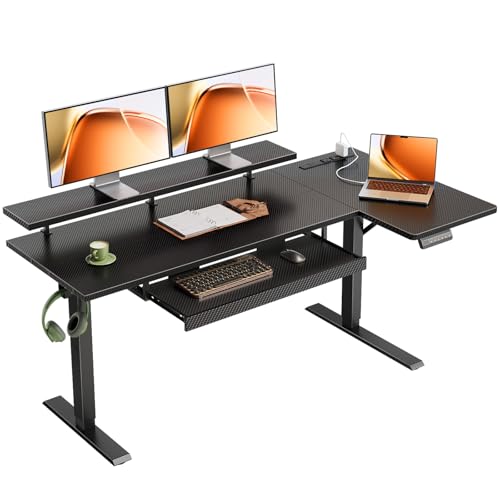
Standing Desk with Pull Out Keyboard: The Complete Buyer's Guide
Everything you need to know about standing desks with pull out keyboard trays — ergonomics, sizing, tray mechanisms, and how to build a workspace that keeps you comfortable whether you sit or stand.
Explore Recommended ModelsWhy a pull out keyboard matters: A standing desk raises your monitor to eye level, but your keyboard and mouse still need a dedicated, correctly positioned surface. A pull out keyboard tray bridges that gap — it slides out from under the desk so your elbows stay near 90 degrees, your wrists remain neutral, and your shoulders stay relaxed in both seated and standing postures. If you are still deciding on the desk itself, our standing desk setup guide covers the broader ergonomic foundation.
What Is a Standing Desk with a Pull Out Keyboard?
A standing desk with a pull out keyboard is a height-adjustable workstation that integrates a sliding tray beneath the main work surface. The tray holds your keyboard and pointing device at a lower, ergonomically tuned level while the main surface stays dedicated to your monitor, documents, and accessories. When you transition from sitting to standing, the tray lets you keep your input devices close to your body without pushing them across a deep desktop.
This configuration is especially useful for people who alternate between seated and standing work throughout the day. Instead of repositioning a keyboard on a fixed desktop, the tray slides in and out, so your reach distance stays consistent. Many models pair well with a standing desk converter with dual monitor mount if you prefer to convert an existing desk rather than replace it entirely.
Key Benefits of a Pull Out Keyboard Tray
Better Wrist & Shoulder Posture
A tray placed a few inches below the desktop keeps your forearms level and your wrists straight, reducing strain during long typing sessions.
Consistent Input Position
Sliding the tray toward you keeps the keyboard within comfortable reach in both seated and standing modes, so you avoid overreaching.
More Usable Desktop
With input devices tucked below, the main surface stays clear for monitors, notebooks, and accessories — useful on compact standing desks.
Smooth Sit-Stand Switching
When the desk rises, the tray comes with it, so your typing posture stays stable without re-arranging your gear.
Types of Pull Out Keyboard Trays
Not all trays are built the same. The mechanism and mounting style affect stability, adjustability, and compatibility with your standing desk frame. Below is a comparison of the most common categories:
| Category | Best For | Key Traits |
|---|---|---|
| Fixed-height slide-out tray | Essential tier setups | Simple rail mechanism, stable, limited vertical adjustment |
| Height-adjustable tray | Balanced tier ergonomics | Adjusts below desktop, better wrist alignment, more hardware |
| Tilt & swivel tray | Mid-range to premium ergonomics | Negative tilt reduces wrist extension, swivel aids reach |
| Clamp-on retrofit tray | Upgrading an existing desk | No drilling required, removable, check frame clearance |
| Integrated tray frame | High-end tier workstations | Built into the desk design, cleanest look, best stability |
What to Look For Before You Choose
- Tray travel distance: Ensure the tray slides out far enough to place the keyboard within comfortable reach without pulling your shoulders forward.
- Weight capacity: A tray that holds a full-size keyboard, wrist rest, and mouse should be rated for the combined load with margin to spare.
- Vertical adjustment: Height-adjustable trays let you tune the drop below the desktop to match your elbow height — especially important on a standing desk.
- Under-desk clearance: Check the space between the desktop and any frame crossbar; trays need a clear path to slide in and out.
- Mouse surface width: Many trays are narrow; if you use a large mouse pad or a trackball, confirm the tray width suits your setup.
- Frame compatibility: For retrofit trays, verify the clamp or rail system works with your desk frame style. Our standing desk frames guide explains common frame layouts.
Ergonomic Setup: Getting the Height Right
The biggest advantage of a pull out keyboard is adjustability — but only if you tune it correctly. Here is a practical sequence for both seated and standing modes:
- Seated mode: Set your chair so your feet are flat and knees near 90 degrees. The tray should sit so your elbows rest near 90 degrees with your shoulders relaxed and wrists flat.
- Standing mode: Raise the desk until the monitor top sits near eye level. Then check the tray — your forearms should be roughly parallel to the floor, with wrists neutral and no upward bend.
- Reach check: Slide the tray out so the keyboard sits close to your body. Your upper arms should hang naturally rather than reaching forward.
- Monitor distance: Keep the screen about an arm's length away. If the tray pushes you back, adjust monitor depth rather than overreaching for the keyboard.
If you want a numeric starting point, our office desk height calculator can help you estimate standing and seated heights based on your body measurements. Pair that with a properly sized desk mat to keep the tray area comfortable underfoot.
Pull Out Keyboard vs. Keyboard on Desktop
| Aspect | Pull Out Keyboard Tray | Keyboard Directly on Desktop |
|---|---|---|
| Wrist posture | Neutral, tray sits below surface | Often elevated; wrists may bend upward |
| Reach distance | Adjustable via slide-out | Fixed to desktop depth |
| Desktop space | Frees the main surface | Keyboard occupies prime area |
| Sit-stand transitions | Tray moves with desk; position stays consistent | May need repositioning |
| Setup complexity | Slightly higher (install/adjust tray) | Simplest |
Choosing the Right Standing Desk to Pair With a Tray
If you are buying a new desk, look for frames with open under-desk space, stable lift mechanisms, and enough height range to accommodate your standing posture. A double motor standing desk typically offers smoother, more stable height transitions, which matters when a tray is loaded with a keyboard and mouse. For tighter rooms, a standing desk for small desk spaces with a compact tray can preserve floor area while keeping ergonomics intact.
If you already own a fixed desk and want the benefits of a tray without replacing furniture, a stand up desk converter for narrow desk plus a clamp-on tray is a practical retrofit. Those who prefer mobility can explore standing desk on wheels options that let you reposition the whole workstation.
Common Mistakes to Avoid
- Tray set too high: If the tray is level with the desktop, you lose the ergonomic benefit. Aim for a slight drop so wrists stay neutral.
- Tray too shallow: A shallow tray forces the keyboard forward, causing overreach. Confirm travel distance before installing.
- Ignoring mouse space: Many users forget the mouse needs room too. Measure your combined keyboard and mouse footprint.
- Skipping the reach test: After installation, sit and stand through a full work cycle to confirm the tray position works in both modes.
- Overloading the tray: Keep heavy items off the tray; excess weight can strain the slide mechanism over time.
Frequently Asked Questions
What is a standing desk with a pull out keyboard?
A standing desk with a pull out keyboard is a height-adjustable desk that includes a sliding tray beneath the main work surface, designed to hold your keyboard and mouse at a comfortable, ergonomic level whether you are sitting or standing.
Does a keyboard tray help with ergonomics on a standing desk?
Yes. A properly positioned pull out keyboard tray helps keep your wrists straight, elbows near 90 degrees, and shoulders relaxed, reducing strain whether you sit or stand during the workday.
Can I add a pull out keyboard tray to an existing standing desk?
In many cases, yes. Clamp-on or under-desk mounted keyboard trays can be retrofitted to most standing desks, provided the frame and under-surface clearance allow it. Check the tray's weight capacity and the desk frame's crossbar position before installing.
What height should a pull out keyboard tray be?
Ideally, the tray should allow your elbows to rest near a 90-degree angle with your shoulders relaxed. Many adjustable trays sit a few inches below the main desk surface so your wrists stay flat and neutral.
Final Verdict: Is a Pull Out Keyboard Worth It?
For anyone who alternates between sitting and standing, a pull out keyboard tray is one of the most practical upgrades you can make. It keeps your input devices at a consistent, comfortable distance, protects your wrists from awkward angles, and frees up the main desktop for monitors and accessories.
If you are still assembling your workspace, start with a stable height-adjustable frame, then pair it with an adjustable tray and a supportive chair. Our guides on sit-stand desks for home office and adjustable height desk chair for standing desk can help you complete the setup.
Ready to compare models? Explore the recommended options below and choose the configuration that fits your workspace and posture goals.