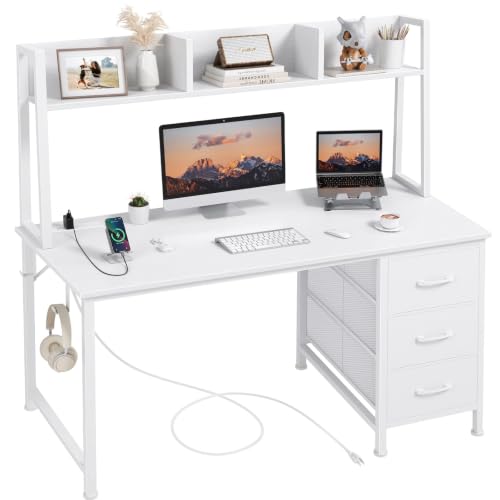
Study Desk Guide: Build a Focused, Productive Study Space
A well-chosen study desk is the foundation of every successful study session. This guide walks you through desk types, materials, ergonomics, and layout so you can choose a workspace that keeps you focused, organized, and comfortable for long hours of learning.
Explore Study Desk OptionsWhy the Right Study Desk Matters
A study desk is more than a flat surface for books and a laptop. It is the anchor of your daily learning routine. The desk you choose influences your posture, your ability to concentrate, and how quickly you can switch between reading, writing, and digital work. Students who study at a dedicated, well-planned desk tend to build stronger study habits because the workspace itself signals that it is time to focus.
Research on learning environments consistently shows that physical comfort and reduced visual clutter contribute to better attention span. A desk that is too small forces you to stack materials awkwardly; a desk that is too tall or too low strains your neck and shoulders. Choosing a study desk with the right dimensions, surface material, and storage capacity removes these friction points so your energy goes into learning rather than adjusting your setup.
Whether you are a high school student preparing for exams, a university learner balancing readings and projects, or an adult returning to structured study, the principles in this guide apply. If you are starting from scratch, our complete study desk overview pairs well with this deeper dive, and our broader first desk setup guide covers the fundamentals of assembling a workspace from zero.
Study Desk Types Compared
Study desks come in several configurations, and the right one depends on your room size, study style, and the equipment you use. Below is a practical comparison of the most common options, organized by tier and best-fit scenario rather than by any numeric measure.
| Desk Type | Tier | Best For | Considerations |
|---|---|---|---|
| Compact study desk | Essential | Small bedrooms, apartments, light reading and laptop work | Limited surface area; pair with vertical storage |
| Corner study desk | Balanced | Rooms where wall space is tight but corner space is available | Maximizes usable area; check monitor and lamp placement |
| Study desk with hutch | Balanced | Students with many books, binders, and supplies | Adds vertical storage; verify monitor clearance |
| L-shaped study desk | High-end | Multi-subject study, dual monitors, spread-out materials | Requires more floor space; excellent ergonomic zoning |
| Standing study desk | Professional | Long study sessions, posture-conscious learners | Encourages movement; consider a converter if space is limited |
Compact and Small Study Desks
For dorm rooms, shared bedrooms, or studio apartments, a compact desk is often the only practical choice. The key is to choose a model with a deep enough surface for a laptop plus a notebook, and to supplement it with wall-mounted or under-desk storage. If floor space is extremely limited, a wall-mounted folding desk for small spaces lets you reclaim the area when study time ends.
Corner Study Desks
Corner configurations use otherwise wasted room geometry and can provide more working area than a straight desk of similar footprint. They work especially well when paired with an angled monitor position, which many students find comfortable for reading and writing. Explore our selection of small corner desks for home office use if you need a space-efficient solution.
Study Desks with Storage and Hutches
Books, binders, stationery, and chargers multiply quickly. A desk with integrated drawers or a hutch keeps these items within reach but off the primary work surface. Models with a raised shelf are particularly useful because they lift reference materials to eye level. See office desk with hutch and file cabinet options for a structured storage approach, or office desk with storage for simpler drawer-based designs.
L-Shaped and Multi-Zone Study Desks
When you regularly juggle textbooks, a laptop, and handwritten notes, an L-shaped desk lets you dedicate one wing to digital work and the other to reading or writing. This zoning reduces the need to shuffle items mid-session. If you want a polished look, a white and gold L-shaped desk with drawers combines function with a clean aesthetic, while an L-shaped computer desk with drawers and shelves adds heavy-duty storage.
Standing and Height-Adjustable Study Desks
Alternating between sitting and standing is one of the most effective ways to reduce fatigue during long study blocks. A standing desk with electric height adjustment offers smooth transitions and preset heights, which is helpful when multiple people share the desk. If you already own a fixed desk, a stand-up desk on top of regular desk converter is a practical retrofit.
Materials & Surface Choices
The desk surface affects durability, writing feel, and how the workspace looks over years of use. For study purposes, the surface should be smooth enough for writing on paper, resistant to daily wear, and easy to clean.
Solid Wood
Solid wood surfaces — particularly oak and walnut — offer a warm, premium feel and can be refinished if they develop scratches. A solid wood computer desk with drawers is a long-term investment that suits serious study environments. A wooden desk top paired with a separate frame gives you flexibility if you later want to change desk height or leg style. If you prefer a darker, richer grain, walnut desks are a strong choice.
Engineered Wood and Laminate
MDF, plywood, and laminate surfaces are common in student-tier desks. Modern laminate finishes mimic wood convincingly and resist moisture well, making them practical for everyday study use. The trade-off is that deep scratches are harder to repair than solid wood.
Metal and Glass
Metal frames provide rigidity and a modern look, while glass tops are easy to wipe clean and reflect light — helpful in dim rooms. However, glass can feel cold for writing and shows fingerprints quickly, so a desk mat is advisable.
Ergonomics & Comfort Essentials
Ergonomics is not a luxury reserved for office workers. Students often spend two to four hours at a stretch at their desks, and poor posture during those hours leads to neck, shoulder, and lower-back discomfort that erodes concentration.
Desk Height and Chair Pairing
The ideal desk height allows your elbows to rest near a 90-degree angle when typing, with feet flat on the floor. If your desk is fixed and slightly too high, a footrest helps; if it is too low, desk risers can correct it. Pair the desk with a supportive chair — a small desk and chair set for adults is a convenient way to get a matched combination. For added comfort during long sessions, a memory foam cushion for desk chair reduces pressure on the hips and tailbone.
Monitor and Screen Placement
Position the screen so the top of the display is roughly at eye level, about an arm's length away. If you study primarily from a laptop, a laptop stand plus an external keyboard dramatically improves neck posture. Our monitor placement guide covers exact positioning for different desk depths.
Wrist and Arm Support
For heavy typing or note-taking, wrist support matters. A desk mat with wrist rest combines surface protection with cushioning, reducing strain during long writing or coding sessions.
Storage & Organization
A study desk only supports focus when the surface stays clear. Storage is therefore not an afterthought — it is a core requirement. Plan for three categories: active materials (what you are using right now), reference materials (books and notes you consult), and supplies (pens, chargers, sticky notes).
Drawers and Under-Desk Storage
Drawers keep supplies out of sight and reduce visual noise. If your desk lacks built-in drawers, an under-desk storage unit or a rolling pedestal fills the gap. A dedicated under-desk printer stand is useful if you print readings and assignments regularly.
Shelving and Vertical Storage
Vertical space is often underused. A shelf that sits on top of desk adds a reference tier without consuming floor area, and it is ideal for keeping frequently used textbooks within arm's reach. For heavier collections, consider a office desk with raised monitor shelf that integrates storage with screen elevation.
Cable and Charger Management
Tangled cables are a common source of distraction. A small tray or clip system keeps charging cables organized and prevents them from sliding off the desk. If you use a height-adjustable desk, plan cable routing carefully — see our standing desk cable management guide for routing strategies that survive height changes.
Small-Space Organization
If your study area doubles as a bedroom or living space, compact accessories make a big difference. Our small desk accessories roundup covers organizers, clips, and trays sized for limited surfaces.
Lighting & Focus
Lighting is one of the most overlooked elements of a study setup. Insufficient or poorly angled light causes eye strain, headaches, and drowsiness — all of which undermine study efficiency.
Task Lighting
A dedicated desk lamp should illuminate your work surface without casting glare on the screen. Position the lamp opposite your writing hand to avoid shadows. For detailed reading or note-taking, a magnifying desk lamp is a practical choice for fine print and small diagrams.
Color Temperature
Cooler white light (often labeled daylight) supports alertness during focused study, while warmer tones are better for evening reading before sleep. If your lamp supports it, switch between the two across the day. Our guide to warm white bulbs explains how color temperature affects comfort in study environments.
Ambient and Screen Lighting
Avoid studying in a dark room with only a bright screen — the contrast strains your eyes. Add soft ambient light behind the monitor or in the corner of the room. A modern desk light with adjustable brightness lets you balance task and ambient lighting without glare.
Study Desk Buying Checklist
Before you commit to a study desk, run through this checklist. It is organized around the decisions that most affect daily usability.
- Measure your space — including doorways and stairwells if the desk arrives assembled or partially assembled.
- Confirm surface dimensions — width for monitor and books, depth for keyboard and notebooks. A depth of at least 24 inches is comfortable for most study tasks.
- Check height compatibility — match the desk height to your seated elbow height and chair adjustability.
- Decide on storage — drawers, hutch, or separate under-desk units. More storage means less clutter but also more footprint.
- Plan cable routing — especially for height-adjustable desks or multi-device setups.
- Choose a durable surface — solid wood for longevity, laminate for easy maintenance, glass for a bright modern look.
- Consider future flexibility — a desk frame plus separate top lets you upgrade the surface later. A motorized standing desk frame is a strong long-term base if you plan to add height adjustment.
- Verify stability — check reviews for wobble at standing height if you choose an adjustable model. Our guide on standing desk troubleshooting covers common stability and mechanism issues.
Frequently Asked Questions
What size study desk is best for a student?
For a laptop plus notebooks, a surface around 40–48 inches wide and at least 24 inches deep is comfortable. If you use a desktop monitor, textbooks, and writing materials simultaneously, aim for 48–55 inches wide. Always measure your room first and account for chair clearance behind the desk.
Is a standing desk good for studying?
Yes — alternating between sitting and standing reduces fatigue during long study blocks. Many students find that standing improves alertness during reading or review sessions. A height-adjustable desk is the most flexible option, but a desktop converter works well if you already have a fixed desk.
What is the best desk material for writing by hand?
Solid wood offers the most satisfying writing feel and can be refinished over time. Laminate is smooth and easy to clean but can feel slick for handwriting — pair either surface with a large desk mat or blotter for better grip and cushioning.
How do I keep my study desk organized?
Use a three-zone system: active materials on the surface, reference books on a shelf or hutch, and supplies in drawers or organizers. Clear the surface at the end of each study session and reset it the next day. Cable management accessories prevent charger clutter.
Can a small study desk work for dual monitors?
It is possible but tight. A monitor arm frees up surface area, and a vertical monitor orientation can help. If you need two large displays plus writing space, an L-shaped desk or a desk with a raised shelf is a better fit. Our standing desk for two monitors and laptop guide covers layout options in detail.
What lighting is best for a study desk?
Use a task lamp with adjustable brightness positioned opposite your writing hand, plus soft ambient light to reduce screen contrast. Cooler white light supports alertness for focused work, while warmer tones suit evening reading. Avoid studying with only a bright screen in a dark room.