
L Shaped Computer Desk with Hutch and Drawers: The Complete Buyer's Guide
Everything you need to know before choosing a corner workstation with elevated shelving and concealed storage. Compare layouts, storage types, materials, and ergonomics — then set up a workspace that stays organized every day.
START THE BUYING GUIDEWhat Is an L Shaped Computer Desk with Hutch and Drawers?
An L shaped computer desk with hutch and drawers is a corner workstation built from two connected work surfaces that form an L. The hutch is an elevated shelving unit attached along the back edge of the desk, usually above the primary work zone. Drawers are built into the desk base, often under one wing or inside a pedestal, to store documents, accessories, and office supplies out of sight.
This combination is popular because it solves three common workspace problems at once: limited floor space, cluttered desktops, and insufficient storage. Instead of adding separate bookcases and filing cabinets, the desk itself becomes a compact storage system. Models such as the L shaped desk with hutch and storage show how the two wings can be configured for different work styles, while variants like the L shaped computer desk with drawers and shelves add open shelving for frequently used items.
Key idea: The hutch holds what you want to see (books, binders, decor, small devices), while the drawers hold what you want to hide (paperwork, cables, stationery). Together they keep the main work surface clear for a monitor, keyboard, and mouse.
Typical Configurations
- Hutch over the primary wing: The most common layout. The hutch faces forward and leaves the secondary wing open for spreading out documents or a laptop.
- Corner hutch: Shelving sits in the inside corner, which saves wall space but can reduce monitor clearance if the hutch is deep.
- Drawer pedestal under one wing: A file drawer plus smaller utility drawers gives a balanced mix of filing and small-item storage.
- Reversible return: Some desks let you place the return wing on the left or right, which matters in rooms with fixed windows or doors. Compare options in the L shaped desk with reversible desk category.
Why the L Shape Works in a Home Office
The L shape wraps the workspace around the user instead of stretching it along a single wall. That geometry creates a natural separation between the active work zone (monitor and keyboard) and the support zone (writing, paperwork, or a secondary device). In small rooms, fitting a corner desk into an unused corner often recovers floor space that a straight desk would waste.
For home offices with limited square footage, the corner footprint is especially efficient. A compact model like the L shaped desk for small home office demonstrates how two modest wings can deliver more usable surface than a single long desk of the same total area. If the room is extremely tight, the L shaped desk with drawers for small space option focuses on narrow wings and shallow storage.
The hutch adds vertical storage without extending the floor footprint. That is a major advantage in apartments and bedrooms where every wall is already in use. Users who want the hutch to hold a printer or reference books often choose a model with a bookcase section, such as the L shaped desk with hutch and bookcase.
Who Should Consider This Desk Type
- Remote workers who need a dedicated zone for video calls, documents, and a second monitor.
- Students juggling textbooks, a laptop, and writing space in a shared room.
- Gamers and creators who want a stable platform for a wide monitor plus room for peripherals.
- Households with limited storage where the desk must double as a filing and supply station.
Storage Breakdown: Hutch vs. Drawers
Understanding the difference between hutch storage and drawer storage helps you judge whether a particular model matches your daily routine. The hutch is open or semi-open storage; drawers are closed storage. Each serves a different purpose.
What Belongs on the Hutch
- Reference books, binders, and manuals you consult regularly.
- Small speakers, a router, or a charging station.
- Plants and framed items that make the workspace feel personal.
- A printer in models with a dedicated top shelf.
The L shaped desk with hutch and shelves layout typically offers multiple shelf heights, which helps separate heavy reference material from lighter decor.
What Belongs in the Drawers
- Paper documents, folders, and tax records.
- Cables, adapters, batteries, and small tools.
- Stationery, stamps, and sticky notes.
- Personal items you want out of sight during video calls.
A file cabinet integrated into the desk is the most efficient option for paperwork. The L shaped desk with file drawers configuration and the L shaped desk with drawers and file cabinet layout both prioritize filing capacity over decorative shelving.
Storage tip: Assign the top drawer to items used daily, the file drawer to monthly paperwork, and the hutch shelves to weekly reference material. This simple hierarchy prevents the desktop from becoming a temporary storage area.
Sizing & Space Planning
An L shaped desk is only comfortable if both wings fit the room and the user. Start with the corner footprint, then verify wing lengths, desk height, and hutch depth. A hutch that is too deep can push the monitor too close to the eyes, while a hutch that is too tall can block light from a window.
Measurements That Matter
- Corner footprint: The distance each wing extends from the corner along the wall.
- Wing depth: Common depths are compact, standard, and deep; deeper wings accommodate large monitors but consume more floor space.
- Desk height: Confirm the height suits your seated posture, or check the office desk height calculator before deciding.
- Hutch height and shelf spacing: Ensure the top shelf is reachable and the bottom shelf clears your monitor.
- Chair clearance: Leave room for the chair to rotate between the two wings.
- Drawer extension: File drawers need open space to pull out fully.
If the corner is fixed by a window or a door swing, a reversible model is often the practical choice. The reversible L shaped desk allows the return wing to be placed on either side, which reduces the risk of a poor fit.
Materials & Build Quality
A large corner desk with a hutch and drawers carries more load than a simple writing table. The hutch adds weight to the back edge, and loaded drawers shift the center of gravity. Build quality therefore matters more than it does on a small desk.
Common Materials
- Solid wood: Durable and repairable, with the most substantial feel. Heavier and best suited to permanent setups.
- Engineered wood with laminate or veneer: Consistent finish, lower weight, and good stability when the core is dense. Look for reinforced corners and edge banding.
- Metal frame with wood or laminate top: Strong and stable, often used on adjustable models. Compare frames in the stand-up desk frame guide if you plan to combine a frame with a separate top.
Hardware to Inspect
- Drawer slides: metal ball-bearing slides glide more smoothly than basic roller slides.
- Hutch fasteners: metal brackets and locking cam fittings hold better than simple screws into particle board.
- Leg and corner joints: reinforced brackets reduce wobble on a wide desk.
- Finish: a weather-resistant coating or rust-proof finish on metal parts improves longevity.
Desks that include built-in power are convenient for cable-heavy setups. The L shaped computer desk with power outlet and the L shaped desk with built-in outlets reduce the need for separate power strips.
Workspace Layout & Ergonomics
Layout determines whether the L shape feels spacious or cramped. The primary monitor should sit at eye level on the main wing, with the keyboard directly in front of it. The secondary wing is best used for writing, a laptop, or reference material — not as a second monitor wall.
Ergonomic Placement
- Position the monitor about an arm's length away and slightly below eye level.
- Keep the keyboard and mouse on the same wing as the monitor to avoid twisting.
- Use the corner for items you rarely touch, not for the primary display.
- Place the hutch on the wing opposite your dominant hand if you write on paper frequently.
Users who alternate between sitting and standing sometimes pair a corner desk with a converter. The standing desk converter with dual monitor mount is one option, though a dedicated adjustable model like the L shaped desk that raises and lowers is more stable for full-time standing use.
Cable Management on a Corner Desk
The inside corner is the natural cable highway. Route power and display cables along the back of the corner, then up behind the hutch. Models with integrated routing, such as the L shaped computer desk with cable management, include grommets or channels that make this easier. For additional organization ideas, see the desk file organizer guide and the small desk organizer recommendations.
Ready to Compare Corner Workstations?
Explore curated options for L shaped desks with hutches and drawers, then match a model to your room size, storage needs, and ergonomic priorities.
Explore Desk OptionsComparison Table by Tier
The table below groups common configurations by market tier. Use it to compare storage focus and intended use rather than exact specifications, since individual models vary.
| Tier | Typical Storage Focus | Best For | Build Notes |
|---|---|---|---|
| Entry-level | Two or three drawers, open hutch shelves | Students and first home offices | Engineered wood with laminate finish; lighter framing |
| Mid-range | File drawer plus utility drawers, multi-shelf hutch | Remote workers with moderate filing needs | Denser core board, metal drawer slides, reinforced corners |
| High-end tier | Full pedestal, bookcase hutch, cable grommets | Dedicated home offices and creators | Solid wood or high-grade engineered wood, heavy-duty hardware |
| Professional-grade | Large filing capacity, adjustable hutch, power integration | Full-time remote professionals | Commercial-grade frame, metal-to-metal fittings, durable finish |
Descriptors indicate relative market position and storage capability, not a numeric ranking.
Pros & Cons at a Glance
Advantages
- Uses corner space efficiently
- Hutch adds vertical storage without extra floor space
- Drawers keep paperwork and supplies out of sight
- Separates active work zone from support zone
- Available in compact and full-size configurations
Trade-offs
- Requires a suitable corner with adequate clearance
- Hutch depth can limit monitor placement
- Heavier and harder to move than a straight desk
- Reversible or removable hutch options may be limited
- Drawer capacity varies widely between models
Buying Checklist
Use this checklist before finalizing a choice. It focuses on the details that are easy to overlook in product photos but matter most after assembly.
- Measure both wall lengths and confirm the wings fit without blocking doors or windows.
- Check desk height against your seated elbow height, or use the height calculator.
- Confirm the hutch is deep enough for your monitor but not so deep that it crowds your view.
- Count the drawers and verify at least one file-sized drawer if you handle paperwork.
- Check whether the hutch is removable or the return wing is reversible.
- Look for metal drawer slides and reinforced corner brackets.
- Decide whether integrated power outlets are useful for your device count.
- Plan cable routing along the corner and behind the hutch.
- Check the assembly requirements and whether two people are recommended.
- Verify the finished weight is suitable for your floor and moving plans.
If the room is small, compare compact corner models before committing. The small corner computer desk guide covers narrower footprints, while the L shaped desk with hutch and keyboard tray option keeps the keyboard off the main surface for tighter setups.
Frequently Asked Questions
An L shaped computer desk with a hutch and drawers combines three workspace advantages: an expansive corner-friendly work surface, elevated storage on the hutch, and concealed storage in the drawers. Together they maximize usable room, keep the desktop clear, and organize office essentials within arm's reach.
Measure the corner footprint first, then confirm the desk's two wing lengths and hutch height. Leave clearance for a chair, and check that the hutch does not block wall outlets or windows. For compact rooms, prioritize a shorter wing and shallower drawers; for larger offices, a wider model with a bookcase hutch adds more storage.
Yes. The L shape creates a dedicated work zone, while the hutch adds vertical storage without consuming floor space. Drawers keep documents and accessories out of sight, which helps a home office stay organized and presentable, especially in shared living areas.
Many models offer a removable hutch, and some are reversible so the desk can be configured for left- or right-hand placement. Check the product specifications before buying, because permanently attached hutches and non-reversible returns limit placement in a room.
Solid wood and heavy-duty engineered wood with reinforced framing offer the most durable construction for a large corner desk. Laminate and veneer over MDF provide a consistent finish at a lower weight. Look for high-grade steel hardware on drawers and metal-to-metal fittings where possible.
Route cables along the back corner where the two wings meet, use adhesive cable clips under the hutch shelf, and mount a surge protector behind the hutch. A wireless keyboard and mouse reduce clutter, and labeled cables make future changes easier.
Recommended L Shaped Computer Desk with Hutch and Drawers
⚠️ AFFILIATE DISCLOSURE: This website contains affiliate links. As an Amazon Associate, we earn from qualifying purchases. If you make a purchase through these links, we may receive a small commission at no additional cost to you. Read our full affiliate policy.

SEDETA 55” Farmhouse L Shaped Desk with 4 Drawers, Hutch, Corner Computer Desk with Storage Drawers, L Shaped Gaming Desk with LED Light and Power Outlet for Home Office, Brown
Check price on Amazon
SEDETA 67" x 65" L Shaped Desk with Hutch, RGB LED Corner Computer Desk with Power Sockets, Fluted Home Office Desk with File Drawer, Storage & Glass Display Cabinets for Gaming & Working, Brown
Check price on Amazon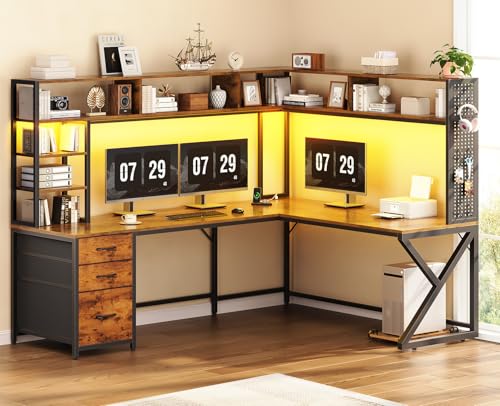
SEDETA L Shaped Computer Desk with Hutch, 3 Drawers, Shelves | Convertible 94.5" Home Office Desk with File Drawer, Power Outlet, LED Lights, Storage and Pegboard, Brown
Check price on Amazon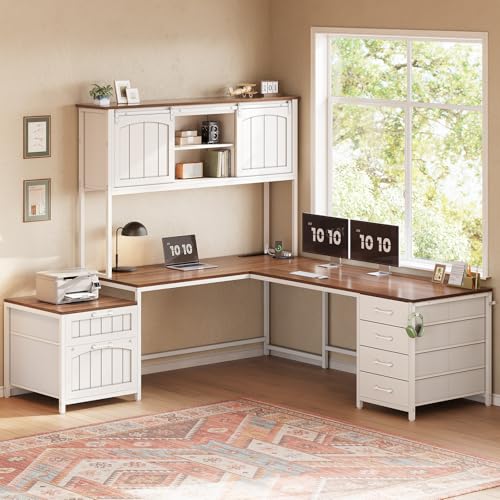
SEDETA Reversible Farmhouse L Shaped Office Desk with 6 Drawer, Hutch | Computer Corner Desk with Power Outlet, File Drawer & Printer Storage Shelves, for Home Office/Two Person, White
Check price on Amazon
SEDETA L Shaped Gaming Corner Desk with Drawers, Hutch and Storage Shelves | Reversible L Shaped Computer Desk, Gaming Desk with Pegboard, Led Lights, and Power Outlet, Home Office Desk, Rustic Brown
Check price on Amazon
SEDETA L Shaped Gaming Corner Desk with Drawers, Hutch and Storage Shelves | Reversible Computer Desk, Gaming Desk with Pegboard, Led Lights, and Power Outlet for Home Office, Small Space, Black
Check price on Amazon
SEDETA Reversible Farmhouse L Shaped Office Desk with 6 Drawer, Hutch | Computer Corner Desk with Power Outlet, File Drawer & Printer Storage Shelves, for Home Office/Two Person, Black
Check price on Amazon